








| 查看: 2427 | 回复: 2 | ||
饿的神啊新虫 (著名写手)
|
[求助]
DNASTAR分析测序结果 已有1人参与
|

|
今天测序的结果返回了,是拼接过的,但是片段比我的目的片段大,是不是还含有载体序列?想通过DNAstar 的seqman去除载体序列,并拼接,用的是TransGen的pEASY-T1的载体,DNAstar中不包括,我自己添加了,但是设置不来啊,求帮助。pEASY-T1全长3928bp,说明书上描述如下: LacZfragment: bases 1-547 M13 reverse priming site: bases 205-221 Multiple cloning site: bases 234-357 T7 promoter/priming site: bases 363-380 M13 Forward (-20) priming site: bases 388-403 f1 origin: bases 545-982 Kanamycin resistance ORF: bases 1316-2110 Ampicillin resistance ORF: bases 2128-2988 pUC origin: bases 3133-3806 以下是DNAstar里的帮助,我没太看懂啊 Follow the steps below to modify a vector definition in the Vector Catalog: 1 From the Project Menu, select Vector Catalog. 2 Use the mouse to select the name of the vector you wish to edit. 3 Click Edit to open the Vector Definition window. Use the Tab key or the mouse to navigate between fields. 4 In the Vector field, edit the vector name. 5 Set a range for the vector sequence in the 5' and 3' coordinate boxes. You may input negative numbers. For instance, if the clone site were in position 75, you could enter -925 into the 5' box and 1075 into the 3' box to leave 1000 base pairs on either side without knowing the length of the vector. (我知道载体片段全长3928bp的话,那是应该设置-3928和3928吗?) 6 In In the Clone Site box, enter the coordinates of the clone site and a range in the box. If you know the precise clone site, enter the position and use a range of 1. If you want a single definition for a number of sites in a polylinker, enter the midpoint position of the range of sites. If you use multiple sites in the same vector for different projects, you may define a separate vector entry for each clone site, provided you give each definition a different vector name. (载体说明书上写的多克隆位点234-357,那这里应该怎么设置呢?) 7 Click OK to accept the modified definition. 求帮忙,纠结很久了,万分感谢! 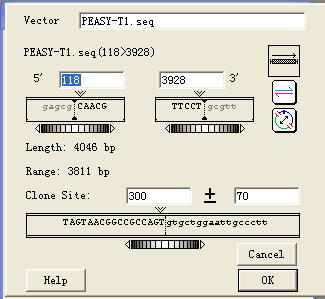 vector.png |
 回复此楼
回复此楼» 猜你喜欢
 SEL120-34A HCl:CDK8/CDK19高选择性激酶抑制剂
已经有0人回复
SEL120-34A HCl:CDK8/CDK19高选择性激酶抑制剂
已经有0人回复
-
氢氧化钾活化操作
已经有19人回复
-
化学工程及工业化学论文润色/翻译怎么收费?
已经有233人回复
-
散金
已经有68人回复
-
生物质超级电容器
已经有0人回复
-
ALK5 高选择性小分子 LY-3200882:可放大合成路线与质控要点解析
已经有0人回复
-
AM630(CAS 164178-33-0):CB2 选择性配体的实验使用与供应要点
已经有0人回复
-
ADC标杆分子T-DM1全解析:从结构设计到实验室应用的技术要点
已经有0人回复
-
HILIC磁珠研究蛋白组学怎么做?
已经有0人回复
-
His标签蛋白纯化怎么才能快?
已经有0人回复
» 本主题相关价值贴推荐,对您同样有帮助:
- SeqMan拼接序列后的几个小问题
已经有5人回复
- 怎样获得反向序列
已经有8人回复
- pcr测序结果分析
已经有15人回复
- 如何进行基因中外显子和内含子的分析
已经有11人回复
- 同源性比对!!!
已经有4人回复
- 求助用dnastar作序列同源性比对
已经有6人回复
- 你们的DNAstar、endnote等软件使用顺利么?
已经有8人回复
- 帮忙看一下一个有关SNP的测序结果图!
已经有4人回复
- 同一个平板上挑的两个菌测序,序列差很多,大家帮我看看啊,有比对图!谢谢啦
已经有18人回复
- DNAMAN多序列比对
已经有7人回复
- DNAssist 很好用的DNA分析软件
已经有7人回复
- 有谁能帮我看下我的测序峰图效果如何
已经有12人回复
- 引物和质粒序列比对
已经有5人回复
- 【求助/交流】如何对PCR测序产物进行分析?
已经有11人回复
- 【求助/交流】PCR产物测序总是不对
已经有13人回复
- 【求助/交流】几个序列的拼接
已经有10人回复
- 【求助/交流】16s 构建进化树
已经有8人回复
- 【求助/交流】怎样在一段序列中查找可能的测序引物?
已经有4人回复
- 生物学软件介绍及其下载地址【学生物的会很有用】
已经有24人回复
wpwupingwp
木虫 (正式写手)
- 应助: 98 (初中生)
- 金币: 3109.8
- 散金: 250
- 红花: 5
- 帖子: 464
- 在线: 125.6小时
- 虫号: 2026298
- 注册: 2012-09-24
- 性别: GG
- 专业: 生物信息学


2楼2015-06-08 10:23:31
3楼2018-04-25 11:25:22