国际会议注册时Student选项为灰色的,无法选中怎么办

在进行国际会议注册时,学生价为460$,但是在注册页面这个选项是灰色的,选中不了。
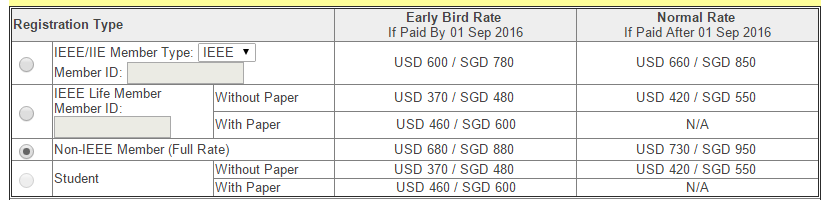
在注册指南上是如下描述的:
Student Registration - Excludes access to conference dinner. Students are required to upload a scanned copy of the student status proof (e.g., a letter issued by the school or the matriculation card) at the end of the registration process. The proof document must be in English and contains minimally the following information:
1) Student name
2) Student matriculation number (student ID with photo)
3) Expiration date (*Expiration / Expected graduation date should be later than the conference date)
4) University name
可是这个选项都没法儿选,怎么上传 the student status proof,有没有哪位大神遇到类似的状况,麻烦指点一下。 返回小木虫查看更多
今日热帖





 京公网安备 11010802022153号
祝福楼主祝福多多,
楼主好运,加油