








| 查看: 3037 | 回复: 11 | ||
| 当前只显示满足指定条件的回帖,点击这里查看本话题的所有回帖 | ||
[求助]
自己编了个matlab数据拟合公式,拟合成功但不显示参数,请问问题出在哪了? 已有2人参与
|
||

|
程序代码如下 data1=xlsread('C:\Users\dell\Desktop\数据拟合\新建 Microsoft Excel 工作表.xlsx',1,'a1:a100'); data=xlsread('C:\Users\dell\Desktop\数据拟合\新建 Microsoft Excel 工作表.xlsx',1,'B1:B100'); x=[data1]; y=[data]; p=fittype('a^x*(b-c)+c','independent','x', 'dependent', 'y') f=fit(x,y,p); plot(f,x,y); p = General model: p(a,b,c,x) = a^x*(b-c)+c 警告: Start point not provided, choosing random start point. > In Warning>Warning.throw at 30 In fit>iFit at 312 In fit at 108 没有显示出abc的结果。。。这是怎么回事?求高手指点。。。 |
 回复此楼
回复此楼» 猜你喜欢
 申博发邮件
已经有4人回复
申博发邮件
已经有4人回复
-
售SCI一区T0P文章,我:8O.55.1.O.54,科目全,可伽急
已经有3人回复
-
售SCI一区T0P文章,我:8.O55.1.O.54,科目全,可十急
已经有3人回复
-
售SCI一区T0P文章,我:8.O.55.1.O.5.4,科目全,可+急
已经有3人回复
-
上海工程技术大学激光智能制造课题组招收博士研究生
已经有6人回复
-
售SCI一区T0P文章,我:8.O55.1.O.54,科目全,可十急
已经有3人回复
-
售SCI一区T0P文章,我:8.O55.1.O.54,科目全,可十急
已经有3人回复
-
售SCI一区文章,我:8.O.55.1.O.54,科目齐全,可伽急
已经有3人回复
-
售SCI一区文章,我:8O5.5.1.O5.4,科目全,可伽急
已经有3人回复
-
售SCI一区T0P文章,我:8O.55.1.O.54,科目全,可伽急
已经有3人回复
» 本主题相关价值贴推荐,对您同样有帮助:
- matlab 数据拟合,求指教!
已经有9人回复
- 使用MATLAB拟合动力学参数问题
已经有18人回复
- Matlab同时拟合活化能,反应级数,速率常数
已经有26人回复
- MATLAB曲线拟合
已经有10人回复
- 关于matlab两个自变量、一个因变量曲线拟合问题
已经有3人回复
- 求助用matlab拟合动力学方程
已经有13人回复
- matlab 拟合方法
已经有4人回复
- matlab 拟合求助
已经有8人回复
- 关于matlab拟合
已经有4人回复
- 通过实验数据拟合,求解公式中的参数
已经有14人回复
- 紧急求助,利用Matlab对实验数据进行拟合求解参数。
已经有27人回复
- matlab数据拟合问题求助
已经有7人回复
- matlab高手帮忙做个自定义复杂函数拟合,含有复数,
已经有25人回复
- matlab 拟合反应动力学参数结果很差。大家帮忙看一下
已经有14人回复
- matlab拟合求值
已经有17人回复
- 【求助】用matlab最优化方法进行参数拟合
已经有17人回复
- 【求助】使用MATLAB拟合出按照公式的系数
已经有19人回复
- 【求助】matlab有公式的曲线拟合
已经有7人回复


7楼2015-05-28 21:45:01
monkeyking0
木虫 (正式写手)
- 应助: 3 (幼儿园)
- 金币: 2157
- 散金: 2291
- 红花: 5
- 帖子: 387
- 在线: 334.7小时
- 虫号: 3087664
- 注册: 2014-03-25
- 专业: 燃烧学
【答案】应助回帖
★ ★ ★ ★ ★ ★ ★ ★ ★ ★ ★ ★ ★ ★ ★ ★ ★ ★ ★ ★ ★ ★ ★ ★ ★ ★ ★ ★ ★ ★ ★ ★ ★ ★ ★ ★ ★ ★ ★ ★ ★ ★ ★ ★ ★ ★ ★ ★ ★ ★
感谢参与,应助指数 +1
右手握炮: 金币+50, ★★★★★最佳答案, 太感谢拉 2015-05-29 14:18:03
感谢参与,应助指数 +1
右手握炮: 金币+50, ★★★★★最佳答案, 太感谢拉 2015-05-29 14:18:03
|
警告: Start point not provided, choosing random start point. 需要设置初始值 您没有提供数据,我随即给了几个值拟合试了下;如下: x = [1:5]'; y =[12.4000;21.7000;35.0000;64.7000;85.3000]; p=fittype('a^x*(b-c)+c','independent','x', 'dependent', 'y'); opt=fitoptions(p); opt.StartPoint=[1 1 0]; f=fit(x,y,p,opt); plot(f,x,y); 结果如图: 在窗口输入f,得到: f = General model: f(x) = a^x*(b-c)+c Coefficients (with 95% confidence bounds): a = 1.311 (0.5083, 2.114) b = 1.55 (-31.32, 34.42) c = -28.15 (-187.1, 130.8) 更细致的问题可以 doc fittype,我也只是搜索了一下,尝试了一下,深入也是不懂的 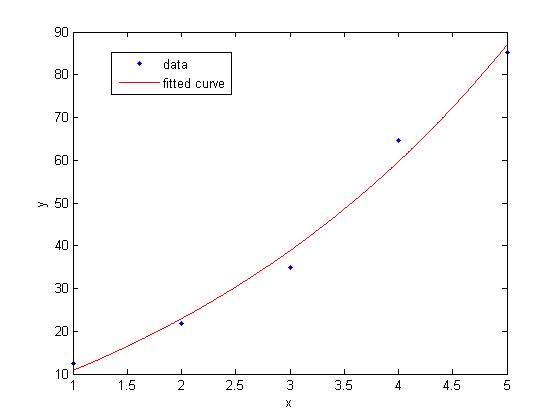 11.jpg |
2楼2015-05-28 20:27:38
|
多谢兄台,我把程序改成这个,没警告了,但不显示abc的值不知是怎么回事,附excel表格 data1=xlsread('C:\Users\dell\Desktop\数据拟合\新建 Microsoft Excel 工作表.xlsx',1,'a1:a100'); data=xlsread('C:\Users\dell\Desktop\数据拟合\新建 Microsoft Excel 工作表.xlsx',1,'B1:B100'); x=[data1]; y=[data]; p=fittype('a^x*(b-c)+c','independent','x', 'dependent', 'y'); opt=fitoptions(p); opt.StartPoint=[0.7 1 0.7]; f=fit(x,y,p,opt); plot(f,x,y); |
3楼2015-05-28 21:09:44
|
x=1到50 y=0.69869602 0.590282096 0.53444396 0.50040014 0.477474302 0.4609846 0.44855435 0.438848807 0.431060579 0.424672595 0.419338377 0.414817048 0.410935948 0.407568082 0.404617959 0.402012394 0.399694353 0.397618734 0.395749397 0.394057046 0.392517681 0.391111457 0.389821815 0.388634834 0.387538726 0.38652344 0.385580354 0.384702032 0.383882023 0.383114707 0.382395163 0.381719064 0.381082591 0.38048236 0.37991536 0.379378906 0.378870595 0.378388268 0.377929983 0.377493986 0.37707869 0.376682654 0.376304569 0.375943242 0.375597582 0.375266593 0.374949359 0.374645041 0.374352865 0.37407212 |
4楼2015-05-28 21:13:53
