








| 查看: 10856 | 回复: 66 | |||||||||||||||
| 【奖励】 本帖被评价59次,作者mywai520增加金币 47.2 个 | |||||||||||||||
[资源]
推荐几个vasp处理计算结果的python脚本
|
|||||||||||||||

|
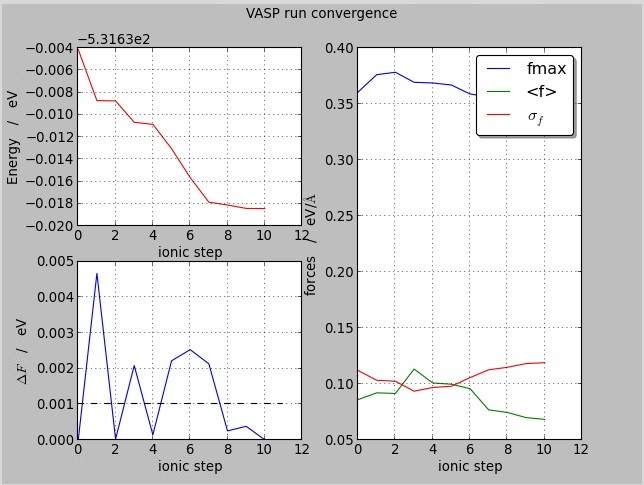
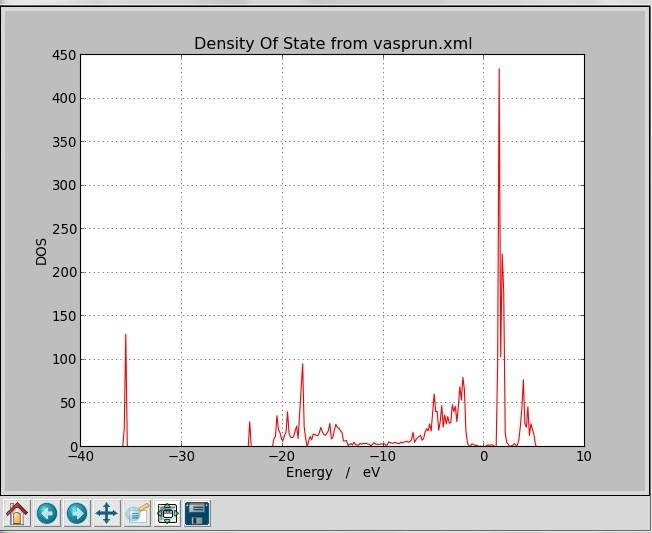
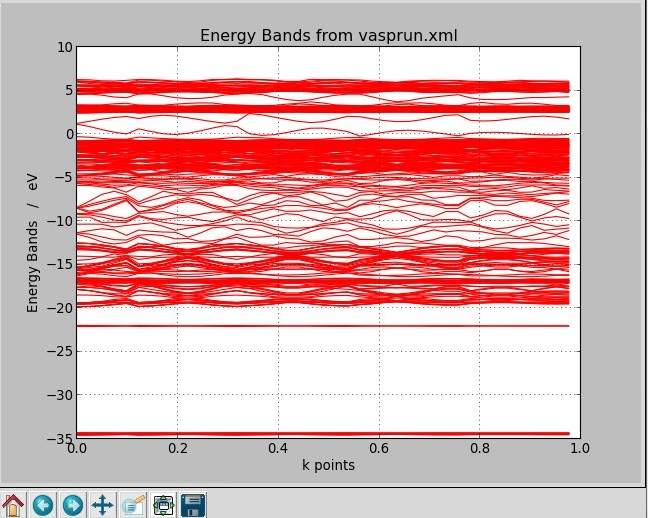
python在处理二维图形还是有很多优势的,在这里推荐几个python脚本。附件中是个人已经下载的相关python脚本。 其中第一个提供的脚本只适应vasp.5.3.3, 第二个提供的脚本需要用到ase,所有需要自己先行安装ase。 1: VASP Tools 下载地址:http://www.nsc.liu.se/~pla/vasptools/ Peter’s collection of small, but useful, VASP scripts. Some of these may be found on NSC’s computers by loading the “vasptools” module. vaspcheck The “vaspcheck” script scans your input files and looks for common errors such as: forgetting to copy CONTCAR to POSCAR, misspelled INCAR tags, and various inconsistent configurations such as having N atoms but only N-x magnetic moments specified. If you supply it with information about the intended number of cpu cores and nodes that you will run on, it will also check the NPAR and KPAR values and warn if they are unreasonable. An alpha version is available in the “vasptools” module on Triolith, and once the script has become more robust, I will make a version available for download here. The idea is to integrate it with the queue system in the future, so that your VASP jobs will be automatically checked when running the “sbatch” command. Install: Click here to download to the Python script. Install it by putting it in a folder in your $PATH (such as~/bin) and then do: mv vaspcheck-standalone.py vaspcheck chmod u+x vaspcheck This should allow you to write “vaspcheck” in any job folder. grad2 The gradient program is used to quickly get an overview of VASP geometry optimization runs. It also works for molecular dynamics. It parses the OUTCAR file and writes a one-line summary per ionic step, including average forces and run-time per step. The output looks like this: $ grad2 OUTCAR Step 1 Energy: -42.794090 Log|dE|: +1.631 Avg|F|: 1.720176 Max|F|: 2.710237 SCF: 15 Time: 0.52m Step 2 Energy: -43.336931 Log|dE|: -0.265 Avg|F|: 0.513256 Max|F|: 0.696803 SCF: 9 Time: 0.32m Step 3 Energy: -43.384337 Log|dE|: -1.324 Avg|F|: 0.095940 Max|F|: 0.178813 SCF: 7 Time: 0.24m Step 4 Energy: -43.387267 Log|dE|: -2.533 Avg|F|: 0.050399 Max|F|: 0.071963 SCF: 6 Time: 0.20m Step 5 Energy: -43.388250 Log|dE|: -3.007 Avg|F|: 0.043184 Max|F|: 0.061866 SCF: 4 Time: 0.13m Step 6 Energy: -43.390384 Log|dE|: -2.671 Avg|F|: 0.030630 Max|F|: 0.047413 SCF: 5 Time: 0.18m Step 7 Energy: -43.392498 Log|dE|: -2.675 Avg|F|: 0.003760 Max|F|: 0.005849 SCF: 6 Time: 0.20m Step 8 Energy: -43.392509 Log|dE|: -4.959 Avg|F|: 0.001285 Max|F|: 0.001861 SCF: 3 Time: 0.09m The Log\|dE\| is the base-10 logarithm of the absolute value of the energy difference between steps, essentially the number of “stable” decimals in the total energy, i.e. for a VASP run with EDIFF=1.0E-5, Log\|dE\| should approach -5 for convergence. If your terminal has colors, each line will be color-coded with red color signalling convergence problems, and green color corresponding to energy convergence having been reached (as judged by the EDIFF tag in the INCAR file.) Install: Click here to download to the Python script (version 2012-01-07). Install it by putting it in a folder in your $PATH (such as~/bin) and then do: mv grad2.py grad2 chmod u+x grad2 This should allow you to write “grad2 OUTCAR” in any job folder. vasp2cif The vasp2cif program creates a CIF-file from a POSCAR/CONTCAR file, which can be used for visualization in graphical applications, such as VESTA. Note that it will not preserve symmetries from VASP – the output CIF is always in P1 symmetry. If there is no POTCAR file available, the script has a flag (“–elements”) whereby you can specify the atomic species. Install: Click here to download to the Python script (version 2012-12-15). Install it by putting it in a folder in your $PATH (such as~/bin) and then do: mv vasp2cif.py vasp2cif chmod u+x vasp2cif This should allow you to write e.g. “vasp2cif CONTCAR” in any job folder. cif2vasp For CIF to VASP input conversion, a recommend a program by Torbjörn Björkman called cif2cell, which can generate input from CIF files for many ab initio programs, including VASP. If anyone is interested in doing high-performance CIF to VASP conversion with optimized C code, I can provide source code to a CIF lexer written with the Ragel state machine compiler and CIF parser written with Lemon. Unfortunately, the tool I built to do CIF to VASP with this framework does not compile correctly anymore on recent platforms, so I cannot put up any binaries for download. You can email me at pla@nsc.liu.se if you want to give it a try. supersize Yet another script to make supercells out of VASP’s POSCAR/CONTCAR files. It is basically a wrapper around the corresponding feature in ASE. It works like this: $ supersize POSCAR 4x4x4 And you get a new POSCAR file called “POSCAR.4x4x4” containing the supercell repeated 4 times in a,b,c directions. You can achieve the same effect with three lines of Python code in ASE: import ase.io.vasp cell = ase.io.vasp.read_vasp("POSCAR"  ase.io.vasp.write_vasp("POSCAR.4x4x4",cell*(4,4,4), label='444supercell',direct=True,sort=True) The script is a little bit more elaborate, however, since it includes error checks. 2. Scripts 下载地址:http://gvallver.perso.univ-pau.fr/vasptools/ The followings scripts are short programs which use the vasptools module. In the terminal if you give the option -h to the script a short help will be printed. chgsplit chgsplit [CHGCAR] Split charge density into spin up and spin down charge density and write them into files. Parameters: CHGCAR (file) – name of a CHGCAR file (default is CHGCAR). Default file name for the CHGCAR file is CHGCAR. In output the spin up charge density is written in file CHGCAR_up and the spin down charge density is written in file CHGCAR_down. Examples chgsplit chgsplit CHGCAR chgsum chgsum CHGCAR1 CHGCAR2 fact1 fact2 Do simple linear operations on charge densities from two CHGCAR file. Parameters: CHGCAR1 (file) – name of the first CHGCAR file CHGCAR2 (file) – name of the second CHGCAR file fact1 (float) – scaling factor for CHGCAR1 (default 1.0) fact2 (float) – scaling factor for CHGCAR2 (default 1.0) On output the file CHGCAR_sum contains the density computed by the following expression fact1 * CHGCAR1 + fact2 * CHGCAR2 Examples chgsum AECAR0 AECAR2 chgsum AECAR0 CHGCAR 1.8 0.2 cvgVASP convVASP [OPTIONS] ... [FILES] convVASP read convergence data on the OUTCAR file and either write them into files in order to plot them with your favorite soft or plot them directly using matplotlib. The last argument has to be an OUTCAR file, if absent, ‘./OUTCAR’ will be used. Parameters: -h – print help and exit -t – instead of plot convergence data, they are printed into files. Examples cvgVASP cvgVASP ../OUTCAR getBands getBands [OPTIONS] ... [FILE] Read energy bands on vasprun.xml file and either extract them into files or plot them directly. The last argument has to be the xml file, if absent ‘./vasprun.xml’ will be used. Parameters: –help (-h) – print this help –tofiles (-t) – Print energy bands into files. –directions (-d) – One file is created for each line of the reciprocal space along which energy bands were computed. This option is relevant only when you want to print energy bands into file, -t option, and if the k-point grid was generated automatically. –quiet (-q) – Remove output Examples getBands getBands -t getDeplacement getDeplacement [FILE1] [FILE2] Read first and last structures in a vasprun.xml file and, for each atom, compute the distance between the initial position and the last position. You can also give two POSCAR files (or CONTCAR). The first one will be use as the initial position and the second will be use as the final position. By default, the file ‘./vasprun.xml’ is read. You can give an other file in the command line. Examples getDeplacement my_calculation.xml getDeplacement POSCAR CONTCAR getDOS getDOS [OPTIONS] ... [FILE] Read density of states data on vasprun.xml files and either extract them into files or plot them directly. The last argument has to be the xml file, if absent ‘./vasprun.xml’ will be used. Parameters: –help (-h) – Print this help –tofiles (-t) – Print total DOS into files. Projected DOS are printed if you add -p option. –projected (-p) – Print projected DOS into files. –quiet (-q) – Low verbosity Examples getDOS getDOS -t getDOS -t -p getDOS -p postDOS postDOS() Read density of states data on vasprun.xml files and do some post treatments : Compute the sum of all projected DOS Compute the contribution to the total DOS of each atom type or the contribution of one specific atom if -iat option is specified. Parameters: –help (-h) – Print help and exit –help – Print help and exit -iat N (int) – Output the contribution of atom N to the total DOS getMaille getMaille [POSCAR] Read the lattice vectors in a POSCAR or CONTCAR file and print the lattice parameters. If you do not give a file name getMaille will print suggestions. getCharges getCharges() Compute atomic charges from a Bader caclculations done with the bader program of the University of Texas at Austin : bader. Parameters: –help (-h) – Print help and exit Run the script in the same directory where you did the bader calculation. Requirements : a ACF.dat file (bader program output). a vasprun.xml file or a POSCAR/CONTCAR file in order to read atom namess. visVMD I wrote this script before I found VESTA and today I do not use it anymore. But it could be useful in order to do nice crystal pictures such as the one in the sidebar. visVMD [OPTIONS] visVMD read output files of VASP and write a VMD script in order to visualize VASP structures with VMD. visVMD can read either POSCAR and CONTCAR files or directly vasprun.xml files. The xml file is the best choice because it contains atom names. If you read a POSCAR or a CONTCAR file of a 4.X version of VASP, visVMD will ask you the name of each atom. Parameters: –help (-h) – print this help -p –prefix prefix (string) – visVMD use [prefix] in order to name output files (default is ‘vis’). -f –file file (string) – file is an output file of VASP containing structure data. It is either the xml file or a POSCAR or CONTCAR (default ‘vasprun.xml’). –poscar – say that the file is either a POSCAR or a CONTCAR –unitcell (-u) – add all images of the atoms of the unit cell which are into the unit cell. –final (-e) – read the last structure of the xml file (default if [file] is an xml file). –initial (-i) – read the first structure of the xml file. -n –supercell N1xN2xN3 (int*int*int) – make a supercell N1 times N2 times N3. Do not set spaces in the expression. –liaisons (-l) – make connectivity between atoms. Examples visVMD -u -l visVMD -u -l --poscar -f POSCAR visVMD -u -l -n 2x2x2 |
 回复此楼
回复此楼» 本帖附件资源列表
-
欢迎监督和反馈:小木虫仅提供交流平台,不对该内容负责。
本内容由用户自主发布,如果其内容涉及到知识产权问题,其责任在于用户本人,如对版权有异议,请联系邮箱:xiaomuchong@tal.com - 附件 1 : VASP_Tools_python.zip
2014-04-03 22:51:37, 3.86 M
» 收录本帖的淘帖专辑推荐
 VASP VASP | 第一性原理计算-tg | VASP软件从入门到高深 | 表界面计算 |
| 计算模拟-MS-CASTEP | vasp | 晶型研究 | VASP资料 |
| VASP | 值得收藏 | 第一性 | 科研 |
| 第一性原理计算 |
» 本帖已获得的红花(最新10朵)
 前田庆次
前田庆次» 猜你喜欢
 售SCI文章,我:8O5.5.1.O.54,科目齐全,可+急
已经有3人回复
售SCI文章,我:8O5.5.1.O.54,科目齐全,可+急
已经有3人回复
-
售SCI文章,我:8O.5.5.1O.54,科目全,可十急
已经有3人回复
-
浙江师范大学是怎么坑我的
已经有4人回复
-
闲聊
已经有6人回复
-
江苏省自然基金 什么时候出结果
已经有7人回复
-
浙江师范大学是怎么坑我的
已经有10人回复
-
求教各位大神:2026教育部人文社科青年基金项目何时公示呀?
已经有6人回复
-
面上有专家说实验设备不是我们单位的
已经有8人回复
-
科研求助
已经有4人回复
» 本主题相关价值贴推荐,对您同样有帮助:
- 用vasp脚本算极化强度,脚本出错,急死了
已经有6人回复
- Shell脚本学习指南
已经有99人回复
- 我自己写了个vasp的shell脚本,高手帮我看看哪错了?
已经有5人回复
- 一个PBS脚本同时运行多个任务
已经有6人回复
- VASP中如何查看正在运行程序的源文件
已经有3人回复
- 对于Fortran计算结果,结果发散?应如何处理?
已经有5人回复
- 【分享】 最新VASP脚本大全 支持VASP 5.3 (有split_dos; VP; Sumdos; sumup_dos 等)
已经有616人回复
- python之蟒开启理论计算化学的新时代
已经有22人回复
- Python学习第一天
已经有54人回复
- VASP的源代码是公开的吗?还有其他可以读懂的程序吗?
已经有12人回复
- 用matlab脚本绘制vasp中的能带图
已经有6人回复
- calculating ideal strength of crystal using VASP
已经有77人回复
- 【求助成功】vasp测试K点收敛性的脚本问题
已经有20人回复
- 【原创】python 写的计算 PCA 的小脚本
已经有4人回复
- 【求助】vasp作业提交脚本
已经有5人回复
- 【求助】求将vasp的输出文件转化成xyz坐标的脚本
已经有11人回复
- 【转帖】强烈推荐使用phonopy计算声子谱
已经有44人回复

2楼2014-04-03 23:02:22
5楼2014-05-05 13:42:05
7楼2014-05-10 09:20:18
8楼2014-05-19 16:14:08
★★★★★ 五星级,优秀推荐
|
很感谢楼主给我们提供这么好的资源!最近我想画自旋电荷密度图,想用chgsplit来处理CHGCAR,但是运行这个小程序读取vasptools.utils时出现了错误,报错是找不到vasptools.utils文件。不知道这是为什么? 我是在你给的链接上找到vasptools.utils的code,然后将code复制黏贴到一个文件中,将这个文件和chgsplit放到同一个目录下运行的,不知道这样做对不对? 对python完全陌生,不知是否要先对这些程序进行编译然后再运行?怎样编译呢?希望楼主能够给一些解答,我自己也在继续摸索中,如果有进展,及时向大家汇报! 谢谢! |
13楼2014-07-03 05:00:55
32楼2015-05-22 14:13:56
44楼2016-01-25 13:20:28
简单回复
stoneyww3楼
2014-04-04 08:24
回复
五星好评 顶一下,感谢分享!
2014-04-04 11:07
回复
五星好评 顶一下,感谢分享!
2014-05-06 13:47
回复
五星好评 顶一下,感谢分享!
2014-06-19 08:37
回复
五星好评 顶一下,感谢分享!
lwk20510楼
2014-06-26 08:45
回复
五星好评 顶一下,感谢分享!
流年水11楼
2014-06-27 12:12
回复
五星好评 顶一下,感谢分享!
2008089012楼
2014-07-02 19:34
回复
五星好评 顶一下,感谢分享!
huichli14楼
2014-07-15 00:07
回复
五星好评 顶一下,感谢分享!
zhaostao15楼
2014-07-26 22:06
回复
五星好评 顶一下,感谢分享!
hnuliquan16楼
2014-07-31 09:38
回复
五星好评 顶一下,感谢分享!
yh316617楼
2014-08-01 10:45
回复
五星好评 顶一下,感谢分享!
佳佳98818楼
2014-09-16 00:52
回复
五星好评 顶一下,感谢分享!
Tius19楼
2014-09-24 22:04
回复
五星好评 顶一下,感谢分享!
fuyuhaoy20楼
2014-10-15 10:56
回复
五星好评 顶一下,感谢分享!
ridge888821楼
2014-11-22 21:36
回复
五星好评 顶一下,感谢分享!
leozpj22楼
2014-12-26 20:54
回复
五星好评 顶一下,感谢分享!
MikeMatt23楼
2015-01-10 15:38
回复
五星好评 顶一下,感谢分享!
韩璐1949100124楼
2015-01-26 11:01
回复
五星好评 顶一下,感谢分享!
不做伸手党25楼
2015-01-28 16:48
回复
五星好评 顶一下,感谢分享!
nanost26楼
2015-02-06 12:07
回复
五星好评 顶一下,感谢分享!
1xiaohua127楼
2015-03-29 15:48
回复
五星好评 顶一下,感谢分享!
wangjb40128楼
2015-04-08 14:55
回复
五星好评 顶一下,感谢分享!
gn0253064029楼
2015-04-08 21:21
回复
五星好评 顶一下,感谢分享!
geqone30楼
2015-05-20 11:08
回复
五星好评 顶一下,感谢分享!
tonglijia31楼
2015-05-22 14:04
回复
五星好评 顶一下,感谢分享!
shadowlisong33楼
2015-05-28 12:55
回复
五星好评 顶一下,感谢分享!
凉风送爽34楼
2015-06-26 14:48
回复
五星好评 顶一下,感谢分享!
凉风送爽35楼
2015-06-26 14:49
回复
感谢分享
li63413970536楼
2015-07-17 14:00
回复
五星好评 顶一下,感谢分享!
txwang37楼
2015-09-19 18:10
回复
五星好评 顶一下,感谢分享!
jackjiejl38楼
2015-10-31 19:16
回复
五星好评 顶一下,感谢分享!
Hysen39楼
2015-11-10 20:25
回复
五星好评 顶一下,感谢分享!
wenshow1140楼
2015-12-30 10:08
回复
五星好评 顶一下,感谢分享!
zbai41楼
2016-01-21 13:34
回复
五星好评 顶一下,感谢分享!
solarman42楼
2016-01-23 10:03
回复
五星好评 顶一下,感谢分享!
yymmwl43楼
2016-01-25 10:57
回复
五星好评 顶一下,感谢分享!
wlyht45楼
2016-03-10 14:26
回复
五星好评 顶一下,感谢分享!
biancheng15946楼
2016-03-19 16:01
回复
五星好评 顶一下,感谢分享!
灵魂双舞47楼
2016-03-28 15:06
回复
五星好评 顶一下,感谢分享!
txwang48楼
2016-04-30 11:15
回复
顶一下,感谢分享!
jylaugh49楼
2016-05-03 21:11
回复
五星好评 顶一下,感谢分享!
sbingyi50楼
2016-06-27 19:38
回复
五星好评 顶一下,感谢分享!