









| 查看: 645 | 回复: 2 | ||||
[求助]
Discover报错 已有2人参与
|

进行优化时总是报错,求大神解释为什么,分配了力场的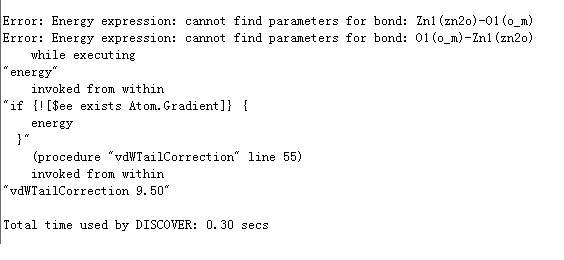 无标题.jpg |
 回复此楼
回复此楼» 猜你喜欢
 Ei源刊怎么投
已经有4人回复
Ei源刊怎么投
已经有4人回复
-
售SCI一区T0P文章,我:8O.55.1.O.54,科目全,可伽急
已经有10人回复
-
面上没中,邀请各位路过的虫友分析一下分数
已经有10人回复
-
广西大学-广州大学招聘博士后 欢迎广大优秀人才!!!
已经有6人回复
-
两块石头
已经有5人回复
-
哈尔滨工业大学韩晓军教授课题组招收2027年硕士推免生及博士研究生
已经有3人回复
-
找导师
已经有8人回复
-
国社科又开始会评了,不知道这次命运如何
已经有14人回复
-
科研人应该花精力去思考如何解决问题,而不是去凝练问题
已经有14人回复
-
要骂人了,新模版改版就是要淡化问题凝练这种虚的东西,结果有个评委还在说凝练得不够
已经有17人回复
» 本主题相关价值贴推荐,对您同样有帮助:
- MS初学者几个问题,望大神帮忙解决
已经有4人回复
- MS discover模块计算问题
已经有6人回复
- workbench计算报错
已经有4人回复
- MS Discover计算纯表面的问题
已经有15人回复
- 关于MS动力学精度设置问题
已经有4人回复
- MS Discover 动力学求助
已经有10人回复
- 在石墨烯表面吸附水分子MS该如何建模
已经有7人回复
- forcite做动力学计算出错了,哪位帮忙看一下是什么原因
已经有11人回复
- MS 连接服务器gateway错误
已经有9人回复
- ms discover 模块中,将时间步长改小,主要是影响什么呢?
已经有6人回复
- Discover中Ewald summation和Dynamics times设定的问题
已经有5人回复
- MS discover dynanic报错
已经有10人回复
- 出错 warning#2 #180
已经有7人回复
- 【求助】关于MS#2和#3的错误问题
已经有3人回复
- 【求助】MS运行报错 The job has failed. Download any results generated so far?
已经有20人回复
- 求助关于error bar的问题
已经有1人回复
- 【求助】The job has failed. Download any results generated so far?
已经有6人回复
- 【求助】L9999报错
已经有7人回复
- 【求助】Job failed during launch process..
已经有7人回复
- 【原创】GAUSSION计算常见错误及解决方案
已经有32人回复
★
感谢参与,应助指数 +1
月只蓝: 金币+1, 感谢指导! 2014-03-19 20:23:37
感谢参与,应助指数 +1
月只蓝: 金币+1, 感谢指导! 2014-03-19 20:23:37
|
本帖内容被屏蔽 |
2楼2014-03-19 00:03:54
月只蓝
主管区长 (职业作家)
-

专家经验: +1059 - 模拟EPI: 1
- 应助: 1712 (讲师)
- 贵宾: 8.888
- 金币: 68173.7
- 散金: 1938
- 红花: 443
- 沙发: 4
- 帖子: 4373
- 在线: 3292.4小时
- 虫号: 1122189
- 注册: 2010-10-14
- 专业: 宇宙学
- 管辖: 计算模拟区
【答案】应助回帖
感谢参与,应助指数 +1
|
参见:MS help—tutorials—discover tutorials: Forcefield typing in metal oxides 该help文档有针对此问题解释: Forcefield typing uses predefined rules to assign a type to each atom in the structure. For example, a carbon atom in a benzene ring has a different forcefield type to that of one in an alkyl chain, as it will have different preferred geometric and energetic properties associated with it. When atoms are forcefield typed, the carbon atom in the benzene ring will be classified as c3a, whereas that in the chain will be c4. Typing the atoms allows the correct forcefield parameters to be used in determining the energies and forces for your particular system. Usually, forcefield typing is performed automatically by Discover using the general rules of the typing engine, so manual forcefield typing is not required. However, in certain cases, one has to forcefield type the atoms manually to ensure they are set correctly. In the case of ionic structures such as metal oxides, the bonds between the metal and the oxygen atoms are primarily ionic. This means that the concept of a covalent bond is not applicable to these structures and the bond must be deleted for the calculation to proceed. Conversely, the atoms must be bonded so that the forcefield typing engine can detect the environment of the atoms to predict the typing correctly. In these situations, you should use the typing engine in Discover to type the atoms and then remove the bonds before any calculations can be performed. Otherwise, Discover will look for bond parameters which do not exist. |


3楼2014-03-19 20:25:48