









| 查看: 1431 | 回复: 8 | ||||
| 当前只显示满足指定条件的回帖,点击这里查看本话题的所有回帖 | ||||
[交流]
怎么绘制像这样的3D谱图?
|
||||

像图中这样的3D谱图用什么软件可以画吗?origin可不可以?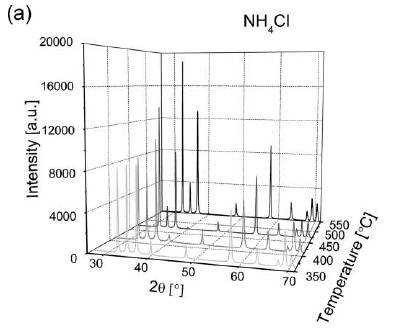 |
 回复此楼
回复此楼» 收录本帖的淘帖专辑推荐
 技术贴 技术贴 |
» 本帖已获得的红花(最新10朵)
» 猜你喜欢
 求高校合作
已经有1人回复
求高校合作
已经有1人回复
-
27级无机化学申博自荐
已经有2人回复
-
无机化学论文润色/翻译怎么收费?
已经有124人回复
-
Chemdraw免费软件
已经有0人回复
-
单晶结构解析,各类疑难晶体数据处理和答疑
已经有38人回复
-
这个水相反应有没有催化剂促进发生
已经有4人回复
-
Mn Me3TACN
已经有5人回复
-
求助最新的CCDC数据库升级包
已经有0人回复
-
高中化学教师求助:配合物一水硫酸四氨合铜的紫外可见吸收光谱数据
已经有2人回复
-
ACS omega,返修返回去目前为in peer review,求助进度问题
已经有2人回复
» 本主题相关价值贴推荐,对您同样有帮助:
- 请大神帮我用Origin将这些数据化成三维曲面图,谢谢!也请把所编的程序也给我,谢谢!
已经有8人回复
- 请问这样的origin图怎么画呀?
已经有8人回复
- 请大家帮我看看图中的两条线是怎么画上去的?origin能画出来么?
已经有11人回复
- ???请教大家,发表论文的3D图用什么软件画比较简单易学???
已经有13人回复
- origin 怎么画这种图
已经有4人回复
- 如何绘制动态流程图????
已经有8人回复
- 哪位大神知道这个3D光谱图是怎么做的?急需啊
已经有7人回复
- 急求Origin三维曲面图制图方法,金币就此散去了~
已经有16人回复
- 在ORIGIN中如何画这种图
已经有11人回复
- 求助已知三维坐标位置,如何画出空间图像
已经有5人回复
- 请问ORINGIN中这样图是如何画的
已经有4人回复
- 下面的图是怎么做出来的
已经有4人回复
- 如何用origin画这样的3D散点图?
已经有7人回复
- 这种3D图片是怎么画的
已经有10人回复
- 请教:在Chem 3d 中如何绘制NOE谱中两个原子的相关!
已经有5人回复
- 已知大量点集的坐标,如何画出其3D图像?
已经有6人回复
- 请问像这种图中的3D效果怎么画?用什么软件画的?
已经有13人回复
- 请问用Vector NTI如何实现在pET28a中加入目的基因片段的谱图绘制。
已经有10人回复
- 【求助】求助这样的晶体XRD图是如何画出的
已经有6人回复

3楼2011-08-25 09:48:47
★ ★
rain841230(金币+1):谢谢参与
 送鲜花一朵
送鲜花一朵
lichun1210(金币+1): 谢谢交流! 2011-08-29 13:44:33
rain841230(金币+1):谢谢参与
送鲜花一朵lichun1210(金币+1): 谢谢交流! 2011-08-29 13:44:33
|
origin 完全可以画这样的图,其本身的帮助文件描述如下: 1> Select column Depth(Z1) and create a 3D scatter plot using the menu Plot->3Dxyz->3D Scatter. 2> Double click on layer icon and add the dataset Depth2(Z2). 3> Change the Z scale to read from 7000 to 0. 4> Select grid line tabs for the three axes and set grid line types and colors and click OK. 5> Invoke the plot details dialog box by right-clicking on the graph. 6> Set the symbol type and connecting line color for both data sets. 7> Set Z drop lines off for second data set. 8> Turn on XY, YZ and XZ projections for both data sets. 9> Set appropriate line colors for projections. 10> Set colors for the three projection planes. 11> Add text labels. 我做了一个类似的3D.opj文件,只要把你的数据依次填进去就可以了(x: 2 theta; y: temp.; Z = intensity) 下载地址: http://good.gd/1535192.htm |

2楼2011-08-25 00:11:34
4楼2011-08-25 11:39:17
6楼2011-08-28 15:43:08