









| 查看: 3321 | 回复: 12 | ||
lidx123木虫 (小有名气)
|
[求助]
Abinit网站中最新的PAW赝势库如何处理 已有1人参与
|

请问Abinit网站中最新的PAW赝势库,下载下来的赝势的格式为.xml,怎么将其转化为可用于计算的格式?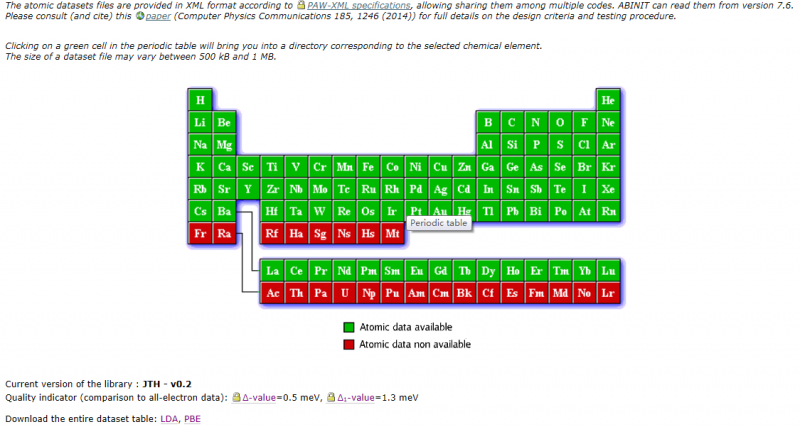 C{RK%2U0@V79P]}FPTY$6]7.png |
 回复此楼
回复此楼» 猜你喜欢
» 本主题相关价值贴推荐,对您同样有帮助:
 有没有用过PBE方法的?急用
已经有3人回复
有没有用过PBE方法的?急用
已经有3人回复
- pwscf收敛速度,参数调节与赝势
已经有19人回复
- 复旦大学quantum espresso培训及其它
已经有33人回复
- PWSCF赝势混用问题
已经有9人回复
- vasp 中的赝势文件()
已经有3人回复
- 问问各路大侠,怎么具体计算电子传输性质,电导等等
已经有11人回复
- abinit中赝势的含义
已经有22人回复
- 【求助】求VASP的赝势库。。
已经有11人回复
- 【转帖】VASP和ABINIT优缺点比较
已经有18人回复
- 【求助】求ABINIT中的PAW赝势文件
已经有6人回复
- 【活动】各种量子力学计算软件使用经验谈(回复就有奖励,讲述详细的奖励5-10金币)
已经有30人回复
- 【分享】ESPRESSO小组刚写的总结性文章
已经有29人回复

2楼2014-10-07 19:45:52
lidx123
木虫 (小有名气)
- 应助: 0 (幼儿园)
- 金币: 3119.5
- 散金: 3
- 红花: 1
- 帖子: 261
- 在线: 171.4小时
- 虫号: 2690529
- 注册: 2013-09-29
- 性别: GG
- 专业: 凝聚态物性 II :电子结构
3楼2014-10-08 22:03:53
4楼2014-10-08 22:25:35
lidx123
木虫 (小有名气)
- 应助: 0 (幼儿园)
- 金币: 3119.5
- 散金: 3
- 红花: 1
- 帖子: 261
- 在线: 171.4小时
- 虫号: 2690529
- 注册: 2013-09-29
- 性别: GG
- 专业: 凝聚态物性 II :电子结构
5楼2014-10-08 23:01:43
6楼2014-10-08 23:16:02
lidx123
木虫 (小有名气)
- 应助: 0 (幼儿园)
- 金币: 3119.5
- 散金: 3
- 红花: 1
- 帖子: 261
- 在线: 171.4小时
- 虫号: 2690529
- 注册: 2013-09-29
- 性别: GG
- 专业: 凝聚态物性 II :电子结构
|
已经下载了libxc # ./configure --with-dft-flavor=libxc #make #make install 但是在# ./configure --with-dft-flavor=libxc时,出现configure: WARNING: unrecognized options: --with-dft-flavor 接下来的make,出现: make[2]: Leaving directory `/home/administrator/lidx/libxc-2.0.1/testsuite' make[2]: Entering directory `/home/administrator/lidx/libxc-2.0.1' make[2]: Leaving directory `/home/administrator/lidx/libxc-2.0.1' make[1]: Leaving directory `/home/administrator/lidx/libxc-2.0.1' 接着make install时,出现错误 administrator@ubuntu:~/lidx/libxc-2.0.1$ sudo make install [sudo] password for administrator: Making install in build make[1]: Entering directory `/home/administrator/lidx/libxc-2.0.1/build' make[2]: Entering directory `/home/administrator/lidx/libxc-2.0.1/build' make[2]: Nothing to be done for `install-exec-am'. /bin/mkdir -p '/opt/etsf/lib/pkgconfig' /usr/bin/install -c -m 644 libxc.pc '/opt/etsf/lib/pkgconfig' make[2]: Leaving directory `/home/administrator/lidx/libxc-2.0.1/build' make[1]: Leaving directory `/home/administrator/lidx/libxc-2.0.1/build' Making install in src make[1]: Entering directory `/home/administrator/lidx/libxc-2.0.1/src' make install-am make[2]: Entering directory `/home/administrator/lidx/libxc-2.0.1/src' make[3]: Entering directory `/home/administrator/lidx/libxc-2.0.1/src' /bin/mkdir -p '/opt/etsf/lib' /bin/bash ../libtool --mode=install /usr/bin/install -c libxc.la '/opt/etsf/lib' libtool: install: /usr/bin/install -c .libs/libxc.lai /opt/etsf/lib/libxc.la libtool: install: /usr/bin/install -c .libs/libxc.a /opt/etsf/lib/libxc.a libtool: install: chmod 644 /opt/etsf/lib/libxc.a libtool: install: ranlib /opt/etsf/lib/libxc.a libtool: finish: PATH="/usr/local/sbin:/usr/local/bin:/usr/sbin:/usr/bin:/sbin:/bin:/sbin" ldconfig -n /opt/etsf/lib ---------------------------------------------------------------------- Libraries have been installed in: /opt/etsf/lib If you ever happen to want to link against installed libraries in a given directory, LIBDIR, you must either use libtool, and specify the full pathname of the library, or use the `-LLIBDIR' flag during linking and do at least one of the following: - add LIBDIR to the `LD_LIBRARY_PATH' environment variable during execution - add LIBDIR to the `LD_RUN_PATH' environment variable during linking - use the `-Wl,-rpath -Wl,LIBDIR' linker flag - have your system administrator add LIBDIR to `/etc/ld.so.conf' See any operating system documentation about shared libraries for more information, such as the ld(1) and ld.so(8) manual pages. ---------------------------------------------------------------------- /bin/mkdir -p '/opt/etsf/include' /usr/bin/install -c -m 644 xc.h xc_config.h '/opt/etsf/include' /bin/mkdir -p '/opt/etsf/include' /usr/bin/install -c -m 644 xc_funcs.h libxc_funcs_m.mod xc_f90_lib_m.mod xc_f90_types_m.mod '/opt/etsf/include' make[3]: Leaving directory `/home/administrator/lidx/libxc-2.0.1/src' make[2]: Leaving directory `/home/administrator/lidx/libxc-2.0.1/src' make[1]: Leaving directory `/home/administrator/lidx/libxc-2.0.1/src' Making install in testsuite make[1]: Entering directory `/home/administrator/lidx/libxc-2.0.1/testsuite' make[2]: Entering directory `/home/administrator/lidx/libxc-2.0.1/testsuite' make[2]: Nothing to be done for `install-exec-am'. make[2]: Nothing to be done for `install-data-am'. make[2]: Leaving directory `/home/administrator/lidx/libxc-2.0.1/testsuite' make[1]: Leaving directory `/home/administrator/lidx/libxc-2.0.1/testsuite' make[1]: Entering directory `/home/administrator/lidx/libxc-2.0.1' make[2]: Entering directory `/home/administrator/lidx/libxc-2.0.1' make[2]: Nothing to be done for `install-exec-am'. /bin/mkdir -p '/opt/etsf/include' /usr/bin/install -c -m 644 xc_version.h '/opt/etsf/include' make[2]: Leaving directory `/home/administrator/lidx/libxc-2.0.1' make[1]: Leaving directory `/home/administrator/lidx/libxc-2.0.1' administrator@ubuntu:~/lidx/libxc-2.0.1$ |
7楼2014-10-08 23:43:51
8楼2014-10-09 00:22:13
lidx123
木虫 (小有名气)
- 应助: 0 (幼儿园)
- 金币: 3119.5
- 散金: 3
- 红花: 1
- 帖子: 261
- 在线: 171.4小时
- 虫号: 2690529
- 注册: 2013-09-29
- 性别: GG
- 专业: 凝聚态物性 II :电子结构
|
请问在abinit的configure的时候 命令为:./configure --with-dft-flavor=libxc 但是make时,出现一下错误: make[3]: Leaving directory `/home/administrator/lidx/abinit-7.8.2/tests' make[2]: Leaving directory `/home/administrator/lidx/abinit-7.8.2/tests' make[2]: Entering directory `/home/administrator/lidx/abinit-7.8.2' make[2]: Leaving directory `/home/administrator/lidx/abinit-7.8.2' make[1]: Leaving directory `/home/administrator/lidx/abinit-7.8.2 sudo make install时,出现: nit-test/doc/help_make' make[3]: Leaving directory `/home/administrator/lidx/abinit-7.8.2/tests' make[2]: Leaving directory `/home/administrator/lidx/abinit-7.8.2/tests' make[1]: Leaving directory `/home/administrator/lidx/abinit-7.8.2/tests' make[1]: Entering directory `/home/administrator/lidx/abinit-7.8.2' make[2]: Entering directory `/home/administrator/lidx/abinit-7.8.2' make[2]: Nothing to be done for `install-exec-am'. /usr/bin/install -c -d -m 755 /usr/local/lib/pkgconfig /usr/bin/install -c -m 644 -m 644 config.pc \ /usr/local/lib/pkgconfig/abinit.pc make[2]: Leaving directory `/home/administrator/lidx/abinit-7.8.2' make[1]: Leaving directory `/home/administrator/lidx/abinit-7.8.2' 请问这怎么解决,是不是需要把“libxc”文件放在什么地方,再进行configure? |
9楼2014-10-09 17:35:04
10楼2014-10-10 19:25:50