24小时热门版块排行榜    

CyRhmU.jpeg
查看: 2954  |  回复: 10
当前只显示满足指定条件的回帖,点击这里查看本话题的所有回帖

17_李赏

新虫 (初入文坛)

[求助] matlab曲线拟合及修正已有2人参与

本人新手,还未对matlab进行深入学习,紧急求助~
已知:x=[8.9 11.7 13.2 13.4 14 14.2 14 10.7 21.671 23.487 20.902 16.507];
    y=[17.698 17.698 27.365 27.365 37.031 37.031 27.365 17.698 66.03 75.696 56.364 37.031]。
请问该如何用matlab拟合出多项式方程y=f(x),然后如何对方程进行修正?
回复此楼

» 收录本帖的淘帖专辑推荐

程序

» 猜你喜欢

» 本主题相关价值贴推荐,对您同样有帮助:

已阅   回复此楼   关注TA 给TA发消息 送TA红花 TA的回帖

阿兵将心

木虫 (正式写手)

清虫

引用回帖:
3楼: Originally posted by 17_李赏 at 2014-06-27 17:13:33
您好!谢谢您关注我的帖子,拟合函数求出来以后,应该怎么进行修正,您知道吗?...

我还没有仔细看过这方面的东西,有文献资料吗?为何要修正呢,拟合不就是修正吗

[ 发自小木虫客户端 ]
学术离我遥远吗
4楼2014-06-27 20:36:36
已阅   回复此楼   关注TA 给TA发消息 送TA红花 TA的回帖
查看全部 11 个回答

阿兵将心

木虫 (正式写手)

清虫

matlab里面有选项来拟合的,高斯拟合,多项式拟合什么的都有,你百度就可以看到的。

[ 发自小木虫客户端 ]
学术离我遥远吗
2楼2014-06-27 15:56:00
已阅   回复此楼   关注TA 给TA发消息 送TA红花 TA的回帖

17_李赏

新虫 (初入文坛)

引用回帖:
2楼: Originally posted by 阿兵将心 at 2014-06-27 15:56:00
matlab里面有选项来拟合的,高斯拟合,多项式拟合什么的都有,你百度就可以看到的。

您好!谢谢您关注我的帖子,拟合函数求出来以后,应该怎么进行修正,您知道吗?
3楼2014-06-27 17:13:33
已阅   回复此楼   关注TA 给TA发消息 送TA红花 TA的回帖

cooooldog

铁杆木虫 (著名写手)

ส็็็

【答案】应助回帖


感谢参与,应助指数 +1
17_李赏: 金币+1, 有帮助 2014-06-29 14:03:46
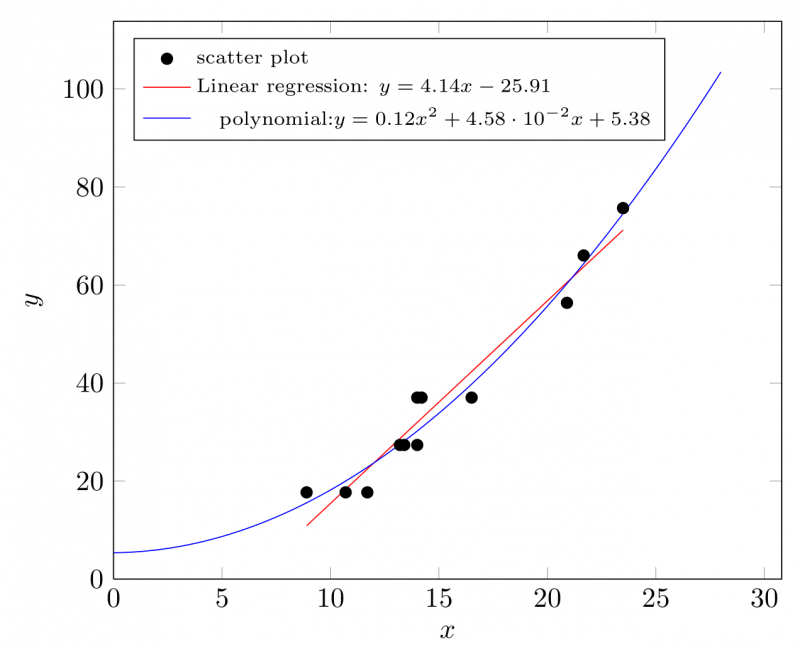
Matlab不是很熟,我用gnuplot+CTeX拟合了一下,凑合着看看吧:

代码:
CODE:
\documentclass[border=10pt]{standalone}
\usepackage{siunitx}
\usepackage{pgfplots}
\pgfplotsset{compat=newest}
\usepackage{pgfplotstable}
\usepackage{filecontents}
\begin{filecontents*}{myData.dat}
X     Y
8.900        17.698
11.700        17.698
13.200        27.365
13.400        27.365
14.000        37.031
14.200        37.031
14.000        27.365
10.700        17.698
21.671        66.030
23.487        75.696
20.902        56.364
16.507        37.031
\end{filecontents*}
\begin{document}
\begin{tikzpicture}
\pgfplotsset{
width=10cm,
legend style={font=\scriptsize}
}
\begin{axis}[%
xlabel=$x$,
ylabel=$y$,
ymin=0,
xmin=0,
scaled y ticks=base 10:0,
legend cell align = left,
legend pos = north west
]
\addplot[only marks] table {mydata.dat};
\addlegendentry{scatter plot};
\addplot+[no markers,red] table [y={create col/linear regression={y=Y}}]{myData.dat};
\addlegendentry{%
Linear regression:  $y=\pgfmathprintnumber{\pgfplotstableregressiona} x
\pgfmathprintnumber[print sign]{\pgfplotstableregressionb}$};
% polynomial fit
\addplot [no markers, blue] gnuplot [raw gnuplot] { % allows arbitrary gnuplot commands
f(x) = a*x**2+b*x+c;     % Define the function to fit
a=10;b=10; c=10;         % Set reasonable starting values here
fit f(x) 'myData.dat' u 1:2 via a,b,c; % Select the file, starts at col 1 and two variables
plot [x=0:28] f(x);    % Specify the range to plot
set print "parameters.dat";  % Open a file to save the parameters
print a, b, c;                  % Write the parameters to file
};
\addlegendentry{\pgfplotstableread{parameters.dat}\parameters % Open the file Gnuplot wrote
\pgfplotstablegetelem{0}{0}\of\parameters \pgfmathsetmacro\paramA{\pgfplotsretval} % Get first element, save into \paramA
\pgfplotstablegetelem{0}{1}\of\parameters \pgfmathsetmacro\paramB{\pgfplotsretval}
\pgfplotstablegetelem{0}{2}\of\parameters \pgfmathsetmacro\paramC{\pgfplotsretval}
polynomial:$y=\pgfmathprintnumber{\paramA} x^2 \pgfmathprintnumber[print sign]{\paramB} x \pgfmathprintnumber[print sign]{\paramC}$
}
\end{axis}
\end{tikzpicture}
\end{document}

matlab曲线拟合及修正
2014-06-27_21-50-07.png

ส็็็็็็็็็็็็็็็็็็็็
5楼2014-06-27 21:50:27
已阅   回复此楼   关注TA 给TA发消息 送TA红花 TA的回帖
信息提示
请填处理意见