









| 查看: 2465 | 回复: 13 | ||
望月任新虫 (小有名气)
|
[求助]
matlab gui求助 已有2人参与
|

如何创建一个按钮调用M文件,并将显示在显示在一个文本框中,如图点击那个浏览按钮所示。谢谢大家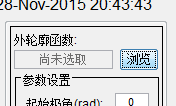 2YKN`C86P@ZR]7}V5BXS]WO.png 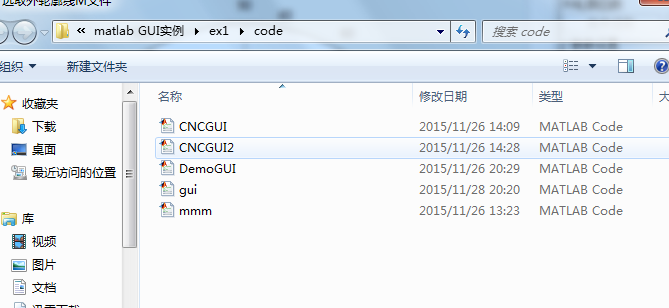 YAO(R~RDP([420[T0B8$0]A.png 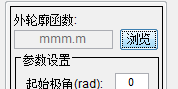 ]O[26OH(QL7YKRV[4K~R5%C.png |
 回复此楼
回复此楼» 猜你喜欢
 烦躁
已经有6人回复
烦躁
已经有6人回复
» 本主题相关价值贴推荐,对您同样有帮助:
- 求助Matlab的GUI问题
已经有1人回复
- MATLAB gui 下拉菜单的实现
已经有1人回复
- matlab 云图求助
已经有0人回复
- MATLAB神经网络GUI
已经有0人回复
- 求助!!!MATLAB的GUI飞行轨迹发生器,哪位大神有啊???帮个忙!!!
已经有0人回复
- MATLAB生命的游戏代码求助
已经有0人回复
- 优化工具箱GUI编程求助
已经有3人回复
- MATLAB 实时视频图像识别系统——求助!!!
已经有10人回复
- matlab GUI 转换 可执行文件
已经有1人回复
- MATLAB GUI 求助
已经有3人回复
- 求助matlab/gui中画四个子图,出来的位置不对,求大虫解决
已经有8人回复
- Matlab绘图再求助
已经有11人回复
- 求助matlab的安装问题
已经有3人回复
- Matlab安装小插件,遇到getconf的问题,求助!!
已经有1人回复
- 【求助】<<MATLAB GUI设计学习手记>>
已经有2人回复
- 【求助】如何分别甄别和提取Matlab 遗传工具GUI的运行结果?
已经有0人回复
- 求助:MATLAB里一个toolbox的GUI找不到
已经有1人回复
- 【求助】Matlab GUI入门的问题
已经有6人回复
- 【求助】matlab的GUI设计ppt或者视频教程
已经有0人回复
achilFes1990
木虫 (著名写手)
- 应助: 363 (硕士)
- 金币: 5307.5
- 红花: 21
- 帖子: 1400
- 在线: 197.1小时
- 虫号: 1115537
- 注册: 2010-10-07
- 性别: GG
- 专业: 海洋工程


2楼2015-11-29 14:24:46
望月任
新虫 (小有名气)
- 应助: 0 (幼儿园)
- 金币: 492.6
- 散金: 30
- 帖子: 141
- 在线: 66.9小时
- 虫号: 3888752
- 注册: 2015-05-25
- 性别: GG
- 专业: 机械工程
3楼2015-11-29 14:26:28
onelightwang
金虫 (小有名气)
- 应助: 10 (幼儿园)
- 金币: 1706.9
- 红花: 1
- 帖子: 94
- 在线: 45.7小时
- 虫号: 3870466
- 注册: 2015-05-14
- 性别: GG
- 专业: 光学信息获取与处理
4楼2015-11-29 16:14:41
望月任
新虫 (小有名气)
- 应助: 0 (幼儿园)
- 金币: 492.6
- 散金: 30
- 帖子: 141
- 在线: 66.9小时
- 虫号: 3888752
- 注册: 2015-05-25
- 性别: GG
- 专业: 机械工程
5楼2015-11-29 18:36:53
6楼2015-11-29 18:37:59
onelightwang
金虫 (小有名气)
- 应助: 10 (幼儿园)
- 金币: 1706.9
- 红花: 1
- 帖子: 94
- 在线: 45.7小时
- 虫号: 3870466
- 注册: 2015-05-14
- 性别: GG
- 专业: 光学信息获取与处理
 望月任
望月任7楼2015-11-30 19:20:48
望月任
新虫 (小有名气)
- 应助: 0 (幼儿园)
- 金币: 492.6
- 散金: 30
- 帖子: 141
- 在线: 66.9小时
- 虫号: 3888752
- 注册: 2015-05-25
- 性别: GG
- 专业: 机械工程
|
function varargout = DemoGUI(varargin) % DEMOGUI M-file for DemoGUI.fig % DEMOGUI, by itself, creates a new DEMOGUI or raises the existing % singleton*. % % H = DEMOGUI returns the handle to a new DEMOGUI or the handle to % the existing singleton*. % % DEMOGUI('CALLBACK',hObject,eventData,handles,...) calls the local % function named CALLBACK in DEMOGUI.M with the given input arguments. % % DEMOGUI('Property','Value',...) creates a new DEMOGUI or raises the % existing singleton*. Starting from the left, property value pairs are % applied to the GUI before DemoGUI_OpeningFunction gets called. An % unrecognized property name or invalid value makes property application % stop. All inputs are passed to DemoGUI_OpeningFcn via varargin. % % *See GUI Options on GUIDE's Tools menu. Choose "GUI allows only one % instance to run (singleton)". % % See also: GUIDE, GUIDATA, GUIHANDLES % Edit the above text to modify the response to help DemoGUI % Last Modified by GUIDE v2.5 16-Apr-2005 18:42:13 % Begin initialization code - DO NOT EDIT gui_Singleton = 1; gui_State = struct('gui_Name', mfilename, ... 'gui_Singleton', gui_Singleton, ... 'gui_OpeningFcn', @DemoGUI_OpeningFcn, ... 'gui_OutputFcn', @DemoGUI_OutputFcn, ... 'gui_LayoutFcn', [] , ... 'gui_Callback', []); if nargin && isstr(varargin{1}) gui_State.gui_Callback = str2func(varargin{1}); end if nargout [varargout{1:nargout}] = gui_mainfcn(gui_State, varargin{:}); else gui_mainfcn(gui_State, varargin{:}); end % End initialization code - DO NOT EDIT % --- Executes just before DemoGUI is made visible. function DemoGUI_OpeningFcn(hObject, eventdata, handles, varargin) % This function has no output args, see OutputFcn. % hObject handle to figure % eventdata reserved - to be defined in a future version of MATLAB % handles structure with handles and user data (see GUIDATA) % varargin command line arguments to DemoGUI (see VARARGIN) % Choose default command line output for DemoGUI handles.output = hObject; % Update handles structure guidata(hObject, handles); % UIWAIT makes DemoGUI wait for user response (see UIRESUME) % uiwait(handles.DemoFig); % 日期时间显示 set(handles.timestr,'string',datestr(now,0)); htimer = timer('StartDelay',1,'TimerFcn',... 'htimestr=findall(0,''tag'',''timestr'');set(htimestr,''string'',datestr(now,0));',... 'Period',1,'ExecutionMode','fixedSpacing','tag','showtime'); start(htimer); set(hObject,'doublebuffer','on'); % --- Outputs from this function are returned to the command line. function varargout = DemoGUI_OutputFcn(hObject, eventdata, handles) % varargout cell array for returning output args (see VARARGOUT); % hObject handle to figure % eventdata reserved - to be defined in a future version of MATLAB % handles structure with handles and user data (see GUIDATA) % Get default command line output from handles structure varargout{1} = handles.output; % --- Executes on button press in ExitBtn. function ExitBtn_Callback(hObject, eventdata, handles) % hObject handle to ExitBtn (see GCBO) % eventdata reserved - to be defined in a future version of MATLAB % handles structure with handles and user data (see GUIDATA) selection = questdlg(['退出 ' get(handles.DemoFig,'Name') '?'],... ['退出 ' get(handles.DemoFig,'Name') '...'],... '是','否','是'); if strcmp(selection,'否') return; end htimer = timerfind('tag','showtime'); stop(htimer); delete(htimer); delete(handles.DemoFig); % --- Executes on button press in HelpBtn. function HelpBtn_Callback(hObject, eventdata, handles) % hObject handle to HelpBtn (see GCBO) % eventdata reserved - to be defined in a future version of MATLAB % handles structure with handles and user data (see GUIDATA) % str={'对不起,目前尚未完成说明文件';' 打算尽快完善整个系统功能及其使用说明'}; % msgbox(str,'使用帮助','help','non-modal'); !CNCHelp.CHM % 精插补按钮回调函数 % --- Executes on button press in JinBtn. function JinBtn_Callback(hObject, eventdata, handles) % hObject handle to JinBtn (see GCBO) % eventdata reserved - to be defined in a future version of MATLAB % handles structure with handles and user data (see GUIDATA) % 获取设置的参数值 theta0 = get(handles.startRad,'UserData'); % 外轮廓起始点极角 thetat = get(handles.endRad,'UserData'); % 外轮廓中止点极角 interpTime = get(handles.interpT,'UserData'); % 插补周期 ms mihuaNum = get(handles.miHuaNum,'UserData'); % 密化点数 jinjiV = get(handles.jinjiV,'UserData'); % 进给速度 mm/min jinjiV = jinjiV/60; % 进给速度mm/sec clrjinline = get(handles.clrJin,'BackgroundColor'); % 精插值点线颜色 % 获取外轮廓函数名 filename = get(handles.SelectFcnBtn,'UserData'); if isempty(filename) msgbox('没有选取轮廓函数!','操作错误'); return; end [pathstr,fcnname] = fileparts(filename); %获得文件名与路径名 % 判断是顺圆还是逆圆插补,实现不管顺圆还是逆圆都可用(不过只测试了顺圆--逆时针插补) if theta0>thetat % 逆圆 flag = -1; else % 顺圆 flag = 1; end set(gcf,'doublebuffer','on'); axis(handles.axes2); % 设置axes2为当前坐标轴 hjinline = line('color',clrjinline,'marker','.','markersize',4,... 'visible','off', 'tag','jinline'); % 创建粗插值线对象 culinedata = getappdata(handles.CuBtn,'culinedata'); % 获取粗插补线数据 cutheta = culinedata(:,1); % 极角 curho = culinedata(:,2); % 极径 numCu = length(culinedata); % 粗插补点数 theta = []; r = []; set(hjinline,'visible','on'); outflag = 0; % hbar = waitbar(0,'Please wait...','name','精插补进行中'); for k = 1:numCu-1 % 对每段粗插补情况 tmptheta = cutheta(k); % theta0 rr0 = curho(k); % rho0 theta = [theta tmptheta]; r = [r rr0]; [xd,yd] = pol2cart(theta,r); % 极坐标变成平面直角坐标 set(hjinline,'xdata',xd,'ydata',yd); for n = 2:mihuaNum % 计算每段粗插补中密化点坐标 drda = drdtheta(fcnname,tmptheta); % 计算该点的数值微分 deletatheta = interpTime/1000*jinjiV/(drda^2+rr0^2)^(0.5); % 计算deltatheta tmptheta = flag*deletatheta+tmptheta; % 迭代求取下一个极角 if flag*tmptheta>flag*cutheta(end) % 对于最后一段的特殊处理,因为最后一段可能比以前的短 tmptheta = cutheta(end); % 是不能够插入num个密化点的 outflag = 1; end rr0 = feval(fcnname,tmptheta); theta = [theta tmptheta]; r = [r rr0]; [xd,yd] = pol2cart(theta,r); set(hjinline,'xdata',xd,'ydata',yd); if outflag==1 break; % 最后一段特殊处理时跳出循环 end end % waitbar(k/(numCu-1),hbar); end % close(hbar); theta = [theta cutheta(end)]; r = [r curho(end)]; jinlinedata = [theta(  r(]; r(];setappdata(hObject,'jinlinedata',jinlinedata); % 保存精插补线数据到句柄中 set(handles.chkJin,'enable','on'); % 使得显示隐藏线复选框可用 chkLegend_Callback(handles.chkLegend,[], handles); % 粗插补按钮回调函数 % --- Executes on button press in CuBtn. function CuBtn_Callback(hObject, eventdata, handles) % hObject handle to CuBtn (see GCBO) % eventdata reserved - to be defined in a future version of MATLAB % handles structure with handles and user data (see GUIDATA) % 获取设置的参数值 theta0 = get(handles.startRad,'UserData'); % 外轮廓起始点极角 thetat = get(handles.endRad,'UserData'); % 外轮廓中止点极角 interpTime = get(handles.interpT,'UserData'); % 插补周期 ms jinjiV = get(handles.jinjiV,'UserData'); % 进给速度 mm/min jinjiV = jinjiV/60; % 进给速度mm/sec clrlunline = get(handles.clrLun,'BackgroundColor'); % 轮廓线颜色 clrculine = get(handles.clrCu,'BackgroundColor'); % 粗插值点线颜色 % 获取外轮廓函数名 filename = get(handles.SelectFcnBtn,'UserData'); if isempty(filename) msgbox('没有选取轮廓函数!','操作错误'); return; end [pathstr,fcnname] = fileparts(filename); addpath(pathstr,'-begin'); % 将外轮廓函数所在路径加入matlab路径中 set(handles.chklun,'enable','on'); % 使复选框可用 set(handles.chkLegend,'enable','on'); % 使复选框可用 set(handles.chkCu,'enable','on'); % 使复选框可用 % 绘制外轮廓线 theta = linspace(theta0,thetat,1000); r = feval(fcnname,theta); % 计算外轮廓 if length(r)~=length(theta) % 通常是由于外轮廓函数不对造成 msgbox('外轮廓函数错误','出错了...'); return; end axis(handles.axes2); hlunline = polar(theta,r); set(hlunline,'color',clrlunline,'tag','lunline'); % 设置tag以后好用 lundata = [theta( r(];setappdata(hObject,'lundata',lundata); % 保存轮廓线数据到句柄中 hold on; hculine = line('color',clrculine,'marker','.','markersize',10,... 'tag','culine'); % 粗插值线对象 'erasemode','xor', hold off; theta = []; r = []; % 判断是顺圆还是逆圆插补,实现不管顺圆还是逆圆都可用(不过只测试了顺圆--逆时针插补) if theta0>thetat % 逆圆 flag = -1; else % 顺圆 flag = 1; end tmptheta = theta0; while flag*tmptheta<flag*thetat % 终止判断,考虑了顺圆与逆圆 rr0 = feval(fcnname,tmptheta); % 计算外轮廓该极角出的极径 theta = [theta tmptheta]; r = [r rr0]; [xd,yd] = pol2cart(theta,r); % 转换为直角坐标系数值 set(hculine,'xdata',xd,'ydata',yd); % 更新插值点 drda = drdtheta(fcnname,tmptheta); % 计算该极角处数值微分 deletatheta = interpTime/1000*jinjiV/(drda^2+rr0^2)^(0.5); tmptheta = flag*deletatheta+tmptheta; % 迭代求取下一个点极角 end rr0 = feval(fcnname,thetat); % 终点加入 theta = [theta thetat]; r = [r rr0]; culinedata = [theta( r(];setappdata(hObject,'culinedata',culinedata); % 保存粗插补线数据到句柄中 set(handles.ExportDataBtn,'enable','on'); set(handles.JinBtn,'enable','on'); chkLegend_Callback(handles.chkLegend,[], handles); % 调用图例复选框的回掉函数 % --- Executes during object creation, after setting all properties. function FcnName_CreateFcn(hObject, eventdata, handles) % hObject handle to FcnName (see GCBO) % eventdata reserved - to be defined in a future version of MATLAB % handles empty - handles not created until after all CreateFcns called % Hint: edit controls usually have a white background on Windows. % See ISPC and COMPUTER. if ispc set(hObject,'BackgroundColor','white'); else set(hObject,'BackgroundColor',get(0,'defaultUicontrolBackgroundColor')); end % --- Executes on button press in SelectFcnBtn. function SelectFcnBtn_Callback(hObject, eventdata, handles) % hObject handle to SelectFcnBtn (see GCBO) % eventdata reserved - to be defined in a future version of MATLAB % handles structure with handles and user data (see GUIDATA) [filename, pathname] = uigetfile('*.m', '选取外轮廓线M文件'); if filename~=0 set(handles.FcnName,'string',filename); set(hObject,'UserData',[pathname filename]); set(handles.JinBtn,'enable','off'); set(handles.ExportDataBtn,'enable','off'); set(handles.chklun,'enable','off'); set(handles.chkCu,'enable','off'); set(handles.chkJin,'enable','off'); set(handles.chkLegend,'value',0,'enable','off'); axis(handles.axes2); cla chkLegend_Callback(handles.chkLegend,[], handles); % 更新图列 else set(handles.FcnName,'string','尚未选取'); end % --- Executes on button press in ExportDataBtn. function ExportDataBtn_Callback(hObject, eventdata, handles) % hObject handle to ExportDataBtn (see GCBO) % eventdata reserved - to be defined in a future version of MATLAB % handles structure with handles and user data (see GUIDATA) % str={'对不起,目前尚未完成说明文件';' 打算尽快完善整个系统功能及其使用说明'}; % msgbox(str,'使用帮助','help','non-modal'); type = get(handles.dataType,'UserData'); % 获取设置的导出数据格式 1-mat,2-txt,3-dat % % 获取各种图线的句柄 % hjinline = findobj(0,'tag','jinline'); % hculine = findobj(0,'tag','culine'); % hlunline = findobj(0,'tag','lunline'); % 保存时 % % handles.CuBtn % setappdata(hObject,'culinedata',culinedata); % 保存粗插补线数据到句柄中 % setappdata(hObject,'lundata',lundata); % 保存轮廓线数据到句柄中 % % handles.JinBtn % setappdata(hObject,'jinlinedata',jinlinedata); % 保存精插补线数据到句柄中 lundata = getappdata(handles.CuBtn,'lundata'); culinedata = getappdata(handles.CuBtn,'culinedata'); jinlinedata = getappdata(handles.JinBtn,'jinlinedata'); switch type case 1, [filename, pathname] = uiputfile('*.mat', '保存插补结果'); if filename==0 % 取消 return; end save([pathname filename],'lundata','culinedata','jinlinedata'); case 2, [filename, pathname] = uiputfile('*.txt', '保存插补结果'); if filename==0 return; end [pathstr,filename]=fileparts(filename); fid = fopen([pathname filename,'.txt'],'w'); fprintf(fid,'\n%=================%s=================\r\n',datestr(now,0)); fprintf(fid,'%原始外轮廓线数据\r\n'); fprintf(fid,'% 极角 \t 极径\r\n'); fprintf(fid,'%8.6f \t %8.6f\r\n',lundata'); fprintf(fid,'%粗插补点数据\r\n'); fprintf(fid,'% 极角 \t 极径\r\n'); fprintf(fid,'%8.6f \t %8.6f\r\n',culinedata'); fprintf(fid,'%精插补点数据\r\n'); fprintf(fid,'% 极角 \t 极径\r\n'); fprintf(fid,'%8.6f \t %8.6f\r\n',jinlinedata'); fclose(fid); case 3, [filename, pathname] = uiputfile('*.dat', '保存插补结果'); if filename==0 return; end [pathstr,filename]=fileparts(filename); save([pathname filename,'.dat'],'lundata','culinedata','jinlinedata','-ascii','-double'); otherwise, msgbox('照道理是不会出现的~'); end % --- Executes on button press in ResetBtn. function ResetBtn_Callback(hObject, eventdata, handles) % hObject handle to ResetBtn (see GCBO) % eventdata reserved - to be defined in a future version of MATLAB % handles structure with handles and user data (see GUIDATA) % 设置各种参数为默认值 set(handles.startRad,'string','0','UserData',0); set(handles.endRad,'string','2*pi','UserData',2*pi); set(handles.miHuaNum,'string','4','UserData',4); set(handles.interpT,'string','8','UserData',8); set(handles.jinjiV,'string','4000','UserData',4000); set(handles.clrLun,'BackgroundColor',[0 0 0]); set(handles.clrCu,'BackgroundColor',[0 0 1]); set(handles.clrJin,'BackgroundColor',[1 1 0.5]); set(handles.dataType,'value',1,'UserData',1); set(handles.chkLegend,'value',0,'UserData',0); % --- Executes during object creation, after setting all properties. function startRad_CreateFcn(hObject, eventdata, handles) % hObject handle to startRad (see GCBO) % eventdata reserved - to be defined in a future version of MATLAB % handles empty - handles not created until after all CreateFcns called % Hint: edit controls usually have a white background on Windows. % See ISPC and COMPUTER. if ispc set(hObject,'BackgroundColor','white'); else set(hObject,'BackgroundColor',get(0,'defaultUicontrolBackgroundColor')); end function startRad_Callback(hObject, eventdata, handles) % hObject handle to startRad (see GCBO) % eventdata reserved - to be defined in a future version of MATLAB % handles structure with handles and user data (see GUIDATA) % Hints: get(hObject,'String') returns contents of startRad as text % str2double(get(hObject,'String')) returns contents of startRad as a double str = get(hObject,'string'); data = str2num(str); if isempty(data) % 输入参数有效性检测 errordlg('输入必须为数值!','参数错误'); set(hObject,'BackgroundColor','r'); else set(hObject,'BackgroundColor','w'); set(hObject,'UserData',data); end % --- Executes during object creation, after setting all properties. function endRad_CreateFcn(hObject, eventdata, handles) % hObject handle to endRad (see GCBO) % eventdata reserved - to be defined in a future version of MATLAB % handles empty - handles not created until after all CreateFcns called % Hint: edit controls usually have a white background on Windows. % See ISPC and COMPUTER. if ispc set(hObject,'BackgroundColor','white'); else set(hObject,'BackgroundColor',get(0,'defaultUicontrolBackgroundColor')); end function endRad_Callback(hObject, eventdata, handles) % hObject handle to endRad (see GCBO) % eventdata reserved - to be defined in a future version of MATLAB % handles structure with handles and user data (see GUIDATA) % Hints: get(hObject,'String') returns contents of endRad as text % str2double(get(hObject,'String')) returns contents of endRad as a double str = get(hObject,'string'); data = str2num(str); if isempty(data) % 输入参数有效性检测 errordlg('输入必须为数值!','参数错误'); set(hObject,'BackgroundColor','r'); else set(hObject,'BackgroundColor','w'); set(hObject,'UserData',data); end % --- Executes during object creation, after setting all properties. function miHuaNum_CreateFcn(hObject, eventdata, handles) % hObject handle to miHuaNum (see GCBO) % eventdata reserved - to be defined in a future version of MATLAB % handles empty - handles not created until after all CreateFcns called % Hint: edit controls usually have a white background on Windows. % See ISPC and COMPUTER. if ispc set(hObject,'BackgroundColor','white'); else set(hObject,'BackgroundColor',get(0,'defaultUicontrolBackgroundColor')); end function miHuaNum_Callback(hObject, eventdata, handles) % hObject handle to miHuaNum (see GCBO) % eventdata reserved - to be defined in a future version of MATLAB % handles structure with handles and user data (see GUIDATA) % Hints: get(hObject,'String') returns contents of miHuaNum as text % str2double(get(hObject,'String')) returns contents of miHuaNum as a double str = get(hObject,'string'); data = str2num(str); if isempty(data) % 输入参数有效性检测 errordlg('输入必须为数值!','参数错误'); set(hObject,'BackgroundColor','r'); else set(hObject,'BackgroundColor','w'); set(hObject,'UserData',data); end % --- Executes during object creation, after setting all properties. function interpT_CreateFcn(hObject, eventdata, handles) % hObject handle to interpT (see GCBO) % eventdata reserved - to be defined in a future version of MATLAB % handles empty - handles not created until after all CreateFcns called % Hint: edit controls usually have a white background on Windows. % See ISPC and COMPUTER. if ispc set(hObject,'BackgroundColor','white'); else set(hObject,'BackgroundColor',get(0,'defaultUicontrolBackgroundColor')); end function interpT_Callback(hObject, eventdata, handles) % hObject handle to interpT (see GCBO) % eventdata reserved - to be defined in a future version of MATLAB % handles structure with handles and user data (see GUIDATA) % Hints: get(hObject,'String') returns contents of interpT as text % str2double(get(hObject,'String')) returns contents of interpT as a double str = get(hObject,'string'); data = str2num(str); if isempty(data) % 输入参数有效性检测 errordlg('输入必须为数值!','参数错误'); set(hObject,'BackgroundColor','r'); else set(hObject,'BackgroundColor','w'); set(hObject,'UserData',data); end % --- Executes during object creation, after setting all properties. function jinjiV_CreateFcn(hObject, eventdata, handles) % hObject handle to jinjiV (see GCBO) % eventdata reserved - to be defined in a future version of MATLAB % handles empty - handles not created until after all CreateFcns called % Hint: edit controls usually have a white background on Windows. % See ISPC and COMPUTER. if ispc set(hObject,'BackgroundColor','white'); else set(hObject,'BackgroundColor',get(0,'defaultUicontrolBackgroundColor')); end function jinjiV_Callback(hObject, eventdata, handles) % hObject handle to jinjiV (see GCBO) % eventdata reserved - to be defined in a future version of MATLAB % handles structure with handles and user data (see GUIDATA) % Hints: get(hObject,'String') returns contents of jinjiV as text % str2double(get(hObject,'String')) returns contents of jinjiV as a double str = get(hObject,'string'); data = str2num(str); if isempty(data) % 输入参数有效性检测 errordlg('输入必须为数值!','参数错误'); set(hObject,'BackgroundColor','r'); else set(hObject,'BackgroundColor','w'); set(hObject,'UserData',data); end % --- Executes during object creation, after setting all properties. function dataType_CreateFcn(hObject, eventdata, handles) % hObject handle to dataType (see GCBO) % eventdata reserved - to be defined in a future version of MATLAB % handles empty - handles not created until after all CreateFcns called % Hint: popupmenu controls usually have a white background on Windows. % See ISPC and COMPUTER. if ispc set(hObject,'BackgroundColor','white'); else set(hObject,'BackgroundColor',get(0,'defaultUicontrolBackgroundColor')); end % --- Executes on selection change in dataType. function dataType_Callback(hObject, eventdata, handles) % hObject handle to dataType (see GCBO) % eventdata reserved - to be defined in a future version of MATLAB % handles structure with handles and user data (see GUIDATA) % Hints: contents = get(hObject,'String') returns dataType contents as cell array % contents{get(hObject,'Value')} returns selected item from dataType % 1 - mat; 2 - txt ; 3 - dat datatype = get(hObject,'Value'); set(hObject,'UserData',datatype); % --- If Enable == 'on', executes on mouse press in 5 pixel border. % --- Otherwise, executes on mouse press in 5 pixel border or over clrLun. function clrLun_ButtonDownFcn(hObject, eventdata, handles) % hObject handle to clrLun (see GCBO) % eventdata reserved - to be defined in a future version of MATLAB % handles structure with handles and user data (see GUIDATA) % 颜色设置处理 color = uisetcolor; if length(color)~=1 % 如果选取了颜色 set(hObject,'BackgroundColor',color); hlunline = findobj(0,'tag','lunline'); if ~isempty(hlunline) % 如果已绘制图线,则按照设置的颜色更新图线 set(hlunline,'color',color); end end % --- If Enable == 'on', executes on mouse press in 5 pixel border. % --- Otherwise, executes on mouse press in 5 pixel border or over clrJin. function clrJin_ButtonDownFcn(hObject, eventdata, handles) % hObject handle to clrJin (see GCBO) % eventdata reserved - to be defined in a future version of MATLAB % handles structure with handles and user data (see GUIDATA) color = uisetcolor; if length(color)~=1 set(hObject,'BackgroundColor',color); hjinline = findobj(0,'tag','jinline'); if ~isempty(hjinline) % 如果已绘制图线,则按照设置的颜色更新图线 set(hjinline,'color',color); end end % --- If Enable == 'on', executes on mouse press in 5 pixel border. % --- Otherwise, executes on mouse press in 5 pixel border or over clrCu. function clrCu_ButtonDownFcn(hObject, eventdata, handles) % hObject handle to clrCu (see GCBO) % eventdata reserved - to be defined in a future version of MATLAB % handles structure with handles and user data (see GUIDATA) color = uisetcolor; if length(color)~=1 set(hObject,'BackgroundColor',color); hculine = findobj(0,'tag','culine'); if ~isempty(hculine) % 如果已绘制图线,则按照设置的颜色更新图线 set(hculine,'color',color); end end % --- Executes on button press in chklun. function chklun_Callback(hObject, eventdata, handles) % hObject handle to chklun (see GCBO) % eventdata reserved - to be defined in a future version of MATLAB % handles structure with handles and user data (see GUIDATA) % Hint: get(hObject,'Value') returns toggle state of chklun % 图线的显示隐藏复选框 val = get(hObject,'Value'); hlunline = findobj(0,'tag','lunline'); if ~isempty(hlunline) % 如果已经绘制图线 if val==1 % 如果是选中复选框 set(hlunline,'visible','on'); % 显示 else set(hlunline,'visible','off'); end chkLegend_Callback(handles.chkLegend,[], handles); % 更新图列 end % --- Executes on button press in chkCu. function chkCu_Callback(hObject, eventdata, handles) % hObject handle to chkCu (see GCBO) % eventdata reserved - to be defined in a future version of MATLAB % handles structure with handles and user data (see GUIDATA) % Hint: get(hObject,'Value') returns toggle state of chkCu val = get(hObject,'Value'); hculine = findobj(0,'tag','culine'); if ~isempty(hculine) if val==1 set(hculine,'visible','on'); else set(hculine,'visible','off'); end chkLegend_Callback(handles.chkLegend,[], handles) end % --- Executes on button press in chkJin. function chkJin_Callback(hObject, eventdata, handles) % hObject handle to chkJin (see GCBO) % eventdata reserved - to be defined in a future version of MATLAB % handles structure with handles and user data (see GUIDATA) % Hint: get(hObject,'Value') returns toggle state of chkJin val = get(hObject,'Value'); hjinline = findobj(0,'tag','jinline'); if ~isempty(hjinline) if val==1 set(hjinline,'visible','on'); else set(hjinline,'visible','off'); end chkLegend_Callback(handles.chkLegend,[], handles) end % --- Executes on button press in chkLegend. function chkLegend_Callback(hObject, eventdata, handles) % hObject handle to chkLegend (see GCBO) % eventdata reserved - to be defined in a future version of MATLAB % handles structure with handles and user data (see GUIDATA) % Hint: get(hObject,'Value') returns toggle state of chkLegend % 图例复选框的处理 val = get(hObject,'Value'); if val ==1 % 如果选中复选框 hjinline = findobj(0,'tag','jinline'); hculine = findobj(0,'tag','culine'); hlunline = findobj(0,'tag','lunline'); % 测试是否已经绘制曲线 并且曲线是否可见 jflag = ~isempty(hjinline) & (get(handles.chkJin,'value')); cflag = ~isempty(hculine) & (get(handles.chkCu,'value')); lflag = ~isempty(hlunline) & (get(handles.chklun,'value')); warning off MATLAB  eprecatedLogicalAPI % 关闭警告信息,因为lflag等是logical,用num2str有警告 eprecatedLogicalAPI % 关闭警告信息,因为lflag等是logical,用num2str有警告strflag = [num2str(lflag) num2str(cflag) num2str(jflag)]; switch strflag case '111', % 全部 legend([hlunline hculine hjinline],'外轮廓线','粗插补点','精插补点',2); % 绘制图例 case '110' % 不显示精插补 legend([hlunline hculine],'外轮廓线','粗插补点',2) case '101', % 不显示粗插补 legend([hlunline hjinline],'外轮廓线','精插补点',2) case '011', % 不显示轮廓线 legend([hculine hjinline],'粗插补点','精插补点',2) case '100', legend(hlunline,'外轮廓线',2) case '001', legend(hjinline,'精插补点',2) case '010', legend(hculine,'粗插补点',2) otherwise legend off % 图例不显示 end else legend off; % 图例不显示 end % 采用等节距五点求导公式的中点公式求数值微分 % 这里存在一个问题是,数值微分的时候,h到底如何选取? % 自动选取的算法是怎么样的?如果要自动选取,速度如何? function dr = drdtheta( fcnname,theta0) % h = 0.001; theta_2 = theta0 - 2*h; theta_1 = theta0 - h; theta1 = theta0 + h; theta2 = theta0 + 2*h; theta = [theta_2 theta_1 theta1 theta2]; r = feval(fcnname,theta); dr = 1/(12*h)*(r(1) - 8*r(2) + 8*r(3) - r(4)); |
8楼2015-11-30 19:42:54
望月任
新虫 (小有名气)
- 应助: 0 (幼儿园)
- 金币: 492.6
- 散金: 30
- 帖子: 141
- 在线: 66.9小时
- 虫号: 3888752
- 注册: 2015-05-25
- 性别: GG
- 专业: 机械工程
|
function varargout = DemoGUI(varargin) % DEMOGUI M-file for DemoGUI.fig % DEMOGUI, by itself, creates a new DEMOGUI or raises the existing % singleton*. % % H = DEMOGUI returns the handle to a new DEMOGUI or the handle to % the existing singleton*. % % DEMOGUI('CALLBACK',hObject,eventData,handles,...) calls the local % function named CALLBACK in DEMOGUI.M with the given input arguments. % % DEMOGUI('Property','Value',...) creates a new DEMOGUI or raises the % existing singleton*. Starting from the left, property value pairs are % applied to the GUI before DemoGUI_OpeningFunction gets called. An % unrecognized property name or invalid value makes property application % stop. All inputs are passed to DemoGUI_OpeningFcn via varargin. % % *See GUI Options on GUIDE's Tools menu. Choose "GUI allows only one % instance to run (singleton)". % % See also: GUIDE, GUIDATA, GUIHANDLES % Edit the above text to modify the response to help DemoGUI % Last Modified by GUIDE v2.5 16-Apr-2005 18:42:13 % Begin initialization code - DO NOT EDIT gui_Singleton = 1; gui_State = struct('gui_Name', mfilename, ... 'gui_Singleton', gui_Singleton, ... 'gui_OpeningFcn', @DemoGUI_OpeningFcn, ... 'gui_OutputFcn', @DemoGUI_OutputFcn, ... 'gui_LayoutFcn', [] , ... 'gui_Callback', []); if nargin && isstr(varargin{1}) gui_State.gui_Callback = str2func(varargin{1}); end if nargout [varargout{1:nargout}] = gui_mainfcn(gui_State, varargin{:}); else gui_mainfcn(gui_State, varargin{:}); end % End initialization code - DO NOT EDIT % --- Executes just before DemoGUI is made visible. function DemoGUI_OpeningFcn(hObject, eventdata, handles, varargin) % This function has no output args, see OutputFcn. % hObject handle to figure % eventdata reserved - to be defined in a future version of MATLAB % handles structure with handles and user data (see GUIDATA) % varargin command line arguments to DemoGUI (see VARARGIN) % Choose default command line output for DemoGUI handles.output = hObject; % Update handles structure guidata(hObject, handles); % UIWAIT makes DemoGUI wait for user response (see UIRESUME) % uiwait(handles.DemoFig); % 日期时间显示 set(handles.timestr,'string',datestr(now,0)); htimer = timer('StartDelay',1,'TimerFcn',... 'htimestr=findall(0,''tag'',''timestr'');set(htimestr,''string'',datestr(now,0));',... 'Period',1,'ExecutionMode','fixedSpacing','tag','showtime'); start(htimer); set(hObject,'doublebuffer','on'); % --- Outputs from this function are returned to the command line. function varargout = DemoGUI_OutputFcn(hObject, eventdata, handles) % varargout cell array for returning output args (see VARARGOUT); % hObject handle to figure % eventdata reserved - to be defined in a future version of MATLAB % handles structure with handles and user data (see GUIDATA) % Get default command line output from handles structure varargout{1} = handles.output; % --- Executes on button press in ExitBtn. function ExitBtn_Callback(hObject, eventdata, handles) % hObject handle to ExitBtn (see GCBO) % eventdata reserved - to be defined in a future version of MATLAB % handles structure with handles and user data (see GUIDATA) selection = questdlg(['退出 ' get(handles.DemoFig,'Name') '?'],... ['退出 ' get(handles.DemoFig,'Name') '...'],... '是','否','是'); if strcmp(selection,'否') return; end htimer = timerfind('tag','showtime'); stop(htimer); delete(htimer); delete(handles.DemoFig); % --- Executes on button press in HelpBtn. function HelpBtn_Callback(hObject, eventdata, handles) % hObject handle to HelpBtn (see GCBO) % eventdata reserved - to be defined in a future version of MATLAB % handles structure with handles and user data (see GUIDATA) % str={'对不起,目前尚未完成说明文件';' 打算尽快完善整个系统功能及其使用说明'}; % msgbox(str,'使用帮助','help','non-modal'); !CNCHelp.CHM % 精插补按钮回调函数 % --- Executes on button press in JinBtn. function JinBtn_Callback(hObject, eventdata, handles) % hObject handle to JinBtn (see GCBO) % eventdata reserved - to be defined in a future version of MATLAB % handles structure with handles and user data (see GUIDATA) % 获取设置的参数值 theta0 = get(handles.startRad,'UserData'); % 外轮廓起始点极角 thetat = get(handles.endRad,'UserData'); % 外轮廓中止点极角 interpTime = get(handles.interpT,'UserData'); % 插补周期 ms mihuaNum = get(handles.miHuaNum,'UserData'); % 密化点数 jinjiV = get(handles.jinjiV,'UserData'); % 进给速度 mm/min jinjiV = jinjiV/60; % 进给速度mm/sec clrjinline = get(handles.clrJin,'BackgroundColor'); % 精插值点线颜色 % 获取外轮廓函数名 filename = get(handles.SelectFcnBtn,'UserData'); if isempty(filename) msgbox('没有选取轮廓函数!','操作错误'); return; end [pathstr,fcnname] = fileparts(filename); %获得文件名与路径名 % 判断是顺圆还是逆圆插补,实现不管顺圆还是逆圆都可用(不过只测试了顺圆--逆时针插补) if theta0>thetat % 逆圆 flag = -1; else % 顺圆 flag = 1; end set(gcf,'doublebuffer','on'); axis(handles.axes2); % 设置axes2为当前坐标轴 hjinline = line('color',clrjinline,'marker','.','markersize',4,... 'visible','off', 'tag','jinline'); % 创建粗插值线对象 culinedata = getappdata(handles.CuBtn,'culinedata'); % 获取粗插补线数据 cutheta = culinedata(:,1); % 极角 curho = culinedata(:,2); % 极径 numCu = length(culinedata); % 粗插补点数 theta = []; r = []; set(hjinline,'visible','on'); outflag = 0; % hbar = waitbar(0,'Please wait...','name','精插补进行中'); for k = 1:numCu-1 % 对每段粗插补情况 tmptheta = cutheta(k); % theta0 rr0 = curho(k); % rho0 theta = [theta tmptheta]; r = [r rr0]; [xd,yd] = pol2cart(theta,r); % 极坐标变成平面直角坐标 set(hjinline,'xdata',xd,'ydata',yd); for n = 2:mihuaNum % 计算每段粗插补中密化点坐标 drda = drdtheta(fcnname,tmptheta); % 计算该点的数值微分 deletatheta = interpTime/1000*jinjiV/(drda^2+rr0^2)^(0.5); % 计算deltatheta tmptheta = flag*deletatheta+tmptheta; % 迭代求取下一个极角 if flag*tmptheta>flag*cutheta(end) % 对于最后一段的特殊处理,因为最后一段可能比以前的短 tmptheta = cutheta(end); % 是不能够插入num个密化点的 outflag = 1; end rr0 = feval(fcnname,tmptheta); theta = [theta tmptheta]; r = [r rr0]; [xd,yd] = pol2cart(theta,r); set(hjinline,'xdata',xd,'ydata',yd); if outflag==1 break; % 最后一段特殊处理时跳出循环 end end % waitbar(k/(numCu-1),hbar); end % close(hbar); theta = [theta cutheta(end)]; r = [r curho(end)]; jinlinedata = [theta( r(];setappdata(hObject,'jinlinedata',jinlinedata); % 保存精插补线数据到句柄中 set(handles.chkJin,'enable','on'); % 使得显示隐藏线复选框可用 chkLegend_Callback(handles.chkLegend,[], handles); % 粗插补按钮回调函数 % --- Executes on button press in CuBtn. function CuBtn_Callback(hObject, eventdata, handles) % hObject handle to CuBtn (see GCBO) % eventdata reserved - to be defined in a future version of MATLAB % handles structure with handles and user data (see GUIDATA) % 获取设置的参数值 theta0 = get(handles.startRad,'UserData'); % 外轮廓起始点极角 thetat = get(handles.endRad,'UserData'); % 外轮廓中止点极角 interpTime = get(handles.interpT,'UserData'); % 插补周期 ms jinjiV = get(handles.jinjiV,'UserData'); % 进给速度 mm/min jinjiV = jinjiV/60; % 进给速度mm/sec clrlunline = get(handles.clrLun,'BackgroundColor'); % 轮廓线颜色 clrculine = get(handles.clrCu,'BackgroundColor'); % 粗插值点线颜色 % 获取外轮廓函数名 filename = get(handles.SelectFcnBtn,'UserData'); if isempty(filename) msgbox('没有选取轮廓函数!','操作错误'); return; end [pathstr,fcnname] = fileparts(filename); addpath(pathstr,'-begin'); % 将外轮廓函数所在路径加入matlab路径中 set(handles.chklun,'enable','on'); % 使复选框可用 set(handles.chkLegend,'enable','on'); % 使复选框可用 set(handles.chkCu,'enable','on'); % 使复选框可用 % 绘制外轮廓线 theta = linspace(theta0,thetat,1000); r = feval(fcnname,theta); % 计算外轮廓 if length(r)~=length(theta) % 通常是由于外轮廓函数不对造成 msgbox('外轮廓函数错误','出错了...'); return; end axis(handles.axes2); hlunline = polar(theta,r); set(hlunline,'color',clrlunline,'tag','lunline'); % 设置tag以后好用 lundata = [theta( r(];setappdata(hObject,'lundata',lundata); % 保存轮廓线数据到句柄中 hold on; hculine = line('color',clrculine,'marker','.','markersize',10,... 'tag','culine'); % 粗插值线对象 'erasemode','xor', hold off; theta = []; r = []; % 判断是顺圆还是逆圆插补,实现不管顺圆还是逆圆都可用(不过只测试了顺圆--逆时针插补) if theta0>thetat % 逆圆 flag = -1; else % 顺圆 flag = 1; end tmptheta = theta0; while flag*tmptheta<flag*thetat % 终止判断,考虑了顺圆与逆圆 rr0 = feval(fcnname,tmptheta); % 计算外轮廓该极角出的极径 theta = [theta tmptheta]; r = [r rr0]; [xd,yd] = pol2cart(theta,r); % 转换为直角坐标系数值 set(hculine,'xdata',xd,'ydata',yd); % 更新插值点 drda = drdtheta(fcnname,tmptheta); % 计算该极角处数值微分 deletatheta = interpTime/1000*jinjiV/(drda^2+rr0^2)^(0.5); tmptheta = flag*deletatheta+tmptheta; % 迭代求取下一个点极角 end rr0 = feval(fcnname,thetat); % 终点加入 theta = [theta thetat]; r = [r rr0]; culinedata = [theta( r(];setappdata(hObject,'culinedata',culinedata); % 保存粗插补线数据到句柄中 set(handles.ExportDataBtn,'enable','on'); set(handles.JinBtn,'enable','on'); chkLegend_Callback(handles.chkLegend,[], handles); % 调用图例复选框的回掉函数 % --- Executes during object creation, after setting all properties. function FcnName_CreateFcn(hObject, eventdata, handles) % hObject handle to FcnName (see GCBO) % eventdata reserved - to be defined in a future version of MATLAB % handles empty - handles not created until after all CreateFcns called % Hint: edit controls usually have a white background on Windows. % See ISPC and COMPUTER. if ispc set(hObject,'BackgroundColor','white'); else set(hObject,'BackgroundColor',get(0,'defaultUicontrolBackgroundColor')); end % --- Executes on button press in SelectFcnBtn. function SelectFcnBtn_Callback(hObject, eventdata, handles) % hObject handle to SelectFcnBtn (see GCBO) % eventdata reserved - to be defined in a future version of MATLAB % handles structure with handles and user data (see GUIDATA) [filename, pathname] = uigetfile('*.m', '选取外轮廓线M文件'); if filename~=0 set(handles.FcnName,'string',filename); set(hObject,'UserData',[pathname filename]); set(handles.JinBtn,'enable','off'); set(handles.ExportDataBtn,'enable','off'); set(handles.chklun,'enable','off'); set(handles.chkCu,'enable','off'); set(handles.chkJin,'enable','off'); set(handles.chkLegend,'value',0,'enable','off'); axis(handles.axes2); cla chkLegend_Callback(handles.chkLegend,[], handles); % 更新图列 else set(handles.FcnName,'string','尚未选取'); end % --- Executes on button press in ExportDataBtn. function ExportDataBtn_Callback(hObject, eventdata, handles) % hObject handle to ExportDataBtn (see GCBO) % eventdata reserved - to be defined in a future version of MATLAB % handles structure with handles and user data (see GUIDATA) % str={'对不起,目前尚未完成说明文件';' 打算尽快完善整个系统功能及其使用说明'}; % msgbox(str,'使用帮助','help','non-modal'); type = get(handles.dataType,'UserData'); % 获取设置的导出数据格式 1-mat,2-txt,3-dat % % 获取各种图线的句柄 % hjinline = findobj(0,'tag','jinline'); % hculine = findobj(0,'tag','culine'); % hlunline = findobj(0,'tag','lunline'); % 保存时 % % handles.CuBtn % setappdata(hObject,'culinedata',culinedata); % 保存粗插补线数据到句柄中 % setappdata(hObject,'lundata',lundata); % 保存轮廓线数据到句柄中 % % handles.JinBtn % setappdata(hObject,'jinlinedata',jinlinedata); % 保存精插补线数据到句柄中 lundata = getappdata(handles.CuBtn,'lundata'); culinedata = getappdata(handles.CuBtn,'culinedata'); jinlinedata = getappdata(handles.JinBtn,'jinlinedata'); switch type case 1, [filename, pathname] = uiputfile('*.mat', '保存插补结果'); if filename==0 % 取消 return; end save([pathname filename],'lundata','culinedata','jinlinedata'); case 2, [filename, pathname] = uiputfile('*.txt', '保存插补结果'); if filename==0 return; end [pathstr,filename]=fileparts(filename); fid = fopen([pathname filename,'.txt'],'w'); fprintf(fid,'\n%=================%s=================\r\n',datestr(now,0)); fprintf(fid,'%原始外轮廓线数据\r\n'); fprintf(fid,'% 极角 \t 极径\r\n'); fprintf(fid,'%8.6f \t %8.6f\r\n',lundata'); fprintf(fid,'%粗插补点数据\r\n'); fprintf(fid,'% 极角 \t 极径\r\n'); fprintf(fid,'%8.6f \t %8.6f\r\n',culinedata'); fprintf(fid,'%精插补点数据\r\n'); fprintf(fid,'% 极角 \t 极径\r\n'); fprintf(fid,'%8.6f \t %8.6f\r\n',jinlinedata'); fclose(fid); case 3, [filename, pathname] = uiputfile('*.dat', '保存插补结果'); if filename==0 return; end [pathstr,filename]=fileparts(filename); save([pathname filename,'.dat'],'lundata','culinedata','jinlinedata','-ascii','-double'); otherwise, msgbox('照道理是不会出现的~'); end % --- Executes on button press in ResetBtn. function ResetBtn_Callback(hObject, eventdata, handles) % hObject handle to ResetBtn (see GCBO) % eventdata reserved - to be defined in a future version of MATLAB % handles structure with handles and user data (see GUIDATA) % 设置各种参数为默认值 set(handles.startRad,'string','0','UserData',0); set(handles.endRad,'string','2*pi','UserData',2*pi); set(handles.miHuaNum,'string','4','UserData',4); set(handles.interpT,'string','8','UserData',8); set(handles.jinjiV,'string','4000','UserData',4000); set(handles.clrLun,'BackgroundColor',[0 0 0]); set(handles.clrCu,'BackgroundColor',[0 0 1]); set(handles.clrJin,'BackgroundColor',[1 1 0.5]); set(handles.dataType,'value',1,'UserData',1); set(handles.chkLegend,'value',0,'UserData',0); % --- Executes during object creation, after setting all properties. function startRad_CreateFcn(hObject, eventdata, handles) % hObject handle to startRad (see GCBO) % eventdata reserved - to be defined in a future version of MATLAB % handles empty - handles not created until after all CreateFcns called % Hint: edit controls usually have a white background on Windows. % See ISPC and COMPUTER. if ispc set(hObject,'BackgroundColor','white'); else set(hObject,'BackgroundColor',get(0,'defaultUicontrolBackgroundColor')); end function startRad_Callback(hObject, eventdata, handles) % hObject handle to startRad (see GCBO) % eventdata reserved - to be defined in a future version of MATLAB % handles structure with handles and user data (see GUIDATA) % Hints: get(hObject,'String') returns contents of startRad as text % str2double(get(hObject,'String')) returns contents of startRad as a double str = get(hObject,'string'); data = str2num(str); if isempty(data) % 输入参数有效性检测 errordlg('输入必须为数值!','参数错误'); set(hObject,'BackgroundColor','r'); else set(hObject,'BackgroundColor','w'); set(hObject,'UserData',data); end % --- Executes during object creation, after setting all properties. function endRad_CreateFcn(hObject, eventdata, handles) % hObject handle to endRad (see GCBO) % eventdata reserved - to be defined in a future version of MATLAB % handles empty - handles not created until after all CreateFcns called % Hint: edit controls usually have a white background on Windows. % See ISPC and COMPUTER. if ispc set(hObject,'BackgroundColor','white'); else set(hObject,'BackgroundColor',get(0,'defaultUicontrolBackgroundColor')); end function endRad_Callback(hObject, eventdata, handles) % hObject handle to endRad (see GCBO) % eventdata reserved - to be defined in a future version of MATLAB % handles structure with handles and user data (see GUIDATA) % Hints: get(hObject,'String') returns contents of endRad as text % str2double(get(hObject,'String')) returns contents of endRad as a double str = get(hObject,'string'); data = str2num(str); if isempty(data) % 输入参数有效性检测 errordlg('输入必须为数值!','参数错误'); set(hObject,'BackgroundColor','r'); else set(hObject,'BackgroundColor','w'); set(hObject,'UserData',data); end % --- Executes during object creation, after setting all properties. function miHuaNum_CreateFcn(hObject, eventdata, handles) % hObject handle to miHuaNum (see GCBO) % eventdata reserved - to be defined in a future version of MATLAB % handles empty - handles not created until after all CreateFcns called % Hint: edit controls usually have a white background on Windows. % See ISPC and COMPUTER. if ispc set(hObject,'BackgroundColor','white'); else set(hObject,'BackgroundColor',get(0,'defaultUicontrolBackgroundColor')); end function miHuaNum_Callback(hObject, eventdata, handles) % hObject handle to miHuaNum (see GCBO) % eventdata reserved - to be defined in a future version of MATLAB % handles structure with handles and user data (see GUIDATA) % Hints: get(hObject,'String') returns contents of miHuaNum as text % str2double(get(hObject,'String')) returns contents of miHuaNum as a double str = get(hObject,'string'); data = str2num(str); if isempty(data) % 输入参数有效性检测 errordlg('输入必须为数值!','参数错误'); set(hObject,'BackgroundColor','r'); else set(hObject,'BackgroundColor','w'); set(hObject,'UserData',data); end % --- Executes during object creation, after setting all properties. function interpT_CreateFcn(hObject, eventdata, handles) % hObject handle to interpT (see GCBO) % eventdata reserved - to be defined in a future version of MATLAB % handles empty - handles not created until after all CreateFcns called % Hint: edit controls usually have a white background on Windows. % See ISPC and COMPUTER. if ispc set(hObject,'BackgroundColor','white'); else set(hObject,'BackgroundColor',get(0,'defaultUicontrolBackgroundColor')); end function interpT_Callback(hObject, eventdata, handles) % hObject handle to interpT (see GCBO) % eventdata reserved - to be defined in a future version of MATLAB % handles structure with handles and user data (see GUIDATA) % Hints: get(hObject,'String') returns contents of interpT as text % str2double(get(hObject,'String')) returns contents of interpT as a double str = get(hObject,'string'); data = str2num(str); if isempty(data) % 输入参数有效性检测 errordlg('输入必须为数值!','参数错误'); set(hObject,'BackgroundColor','r'); else set(hObject,'BackgroundColor','w'); set(hObject,'UserData',data); end % --- Executes during object creation, after setting all properties. function jinjiV_CreateFcn(hObject, eventdata, handles) % hObject handle to jinjiV (see GCBO) % eventdata reserved - to be defined in a future version of MATLAB % handles empty - handles not created until after all CreateFcns called % Hint: edit controls usually have a white background on Windows. % See ISPC and COMPUTER. if ispc set(hObject,'BackgroundColor','white'); else set(hObject,'BackgroundColor',get(0,'defaultUicontrolBackgroundColor')); end function jinjiV_Callback(hObject, eventdata, handles) % hObject handle to jinjiV (see GCBO) % eventdata reserved - to be defined in a future version of MATLAB % handles structure with handles and user data (see GUIDATA) % Hints: get(hObject,'String') returns contents of jinjiV as text % str2double(get(hObject,'String')) returns contents of jinjiV as a double str = get(hObject,'string'); data = str2num(str); if isempty(data) % 输入参数有效性检测 errordlg('输入必须为数值!','参数错误'); set(hObject,'BackgroundColor','r'); else set(hObject,'BackgroundColor','w'); set(hObject,'UserData',data); end % --- Executes during object creation, after setting all properties. function dataType_CreateFcn(hObject, eventdata, handles) % hObject handle to dataType (see GCBO) % eventdata reserved - to be defined in a future version of MATLAB % handles empty - handles not created until after all CreateFcns called % Hint: popupmenu controls usually have a white background on Windows. % See ISPC and COMPUTER. if ispc set(hObject,'BackgroundColor','white'); else set(hObject,'BackgroundColor',get(0,'defaultUicontrolBackgroundColor')); end % --- Executes on selection change in dataType. function dataType_Callback(hObject, eventdata, handles) % hObject handle to dataType (see GCBO) % eventdata reserved - to be defined in a future version of MATLAB % handles structure with handles and user data (see GUIDATA) % Hints: contents = get(hObject,'String') returns dataType contents as cell array % contents{get(hObject,'Value')} returns selected item from dataType % 1 - mat; 2 - txt ; 3 - dat datatype = get(hObject,'Value'); set(hObject,'UserData',datatype); % --- If Enable == 'on', executes on mouse press in 5 pixel border. % --- Otherwise, executes on mouse press in 5 pixel border or over clrLun. function clrLun_ButtonDownFcn(hObject, eventdata, handles) % hObject handle to clrLun (see GCBO) % eventdata reserved - to be defined in a future version of MATLAB % handles structure with handles and user data (see GUIDATA) % 颜色设置处理 color = uisetcolor; if length(color)~=1 % 如果选取了颜色 set(hObject,'BackgroundColor',color); hlunline = findobj(0,'tag','lunline'); if ~isempty(hlunline) % 如果已绘制图线,则按照设置的颜色更新图线 set(hlunline,'color',color); end end % --- If Enable == 'on', executes on mouse press in 5 pixel border. % --- Otherwise, executes on mouse press in 5 pixel border or over clrJin. function clrJin_ButtonDownFcn(hObject, eventdata, handles) % hObject handle to clrJin (see GCBO) % eventdata reserved - to be defined in a future version of MATLAB % handles structure with handles and user data (see GUIDATA) color = uisetcolor; if length(color)~=1 set(hObject,'BackgroundColor',color); hjinline = findobj(0,'tag','jinline'); if ~isempty(hjinline) % 如果已绘制图线,则按照设置的颜色更新图线 set(hjinline,'color',color); end end % --- If Enable == 'on', executes on mouse press in 5 pixel border. % --- Otherwise, executes on mouse press in 5 pixel border or over clrCu. function clrCu_ButtonDownFcn(hObject, eventdata, handles) % hObject handle to clrCu (see GCBO) % eventdata reserved - to be defined in a future version of MATLAB % handles structure with handles and user data (see GUIDATA) color = uisetcolor; if length(color)~=1 set(hObject,'BackgroundColor',color); hculine = findobj(0,'tag','culine'); if ~isempty(hculine) % 如果已绘制图线,则按照设置的颜色更新图线 set(hculine,'color',color); end end % --- Executes on button press in chklun. function chklun_Callback(hObject, eventdata, handles) % hObject handle to chklun (see GCBO) % eventdata reserved - to be defined in a future version of MATLAB % handles structure with handles and user data (see GUIDATA) % Hint: get(hObject,'Value') returns toggle state of chklun % 图线的显示隐藏复选框 val = get(hObject,'Value'); hlunline = findobj(0,'tag','lunline'); if ~isempty(hlunline) % 如果已经绘制图线 if val==1 % 如果是选中复选框 set(hlunline,'visible','on'); % 显示 else set(hlunline,'visible','off'); end chkLegend_Callback(handles.chkLegend,[], handles); % 更新图列 end % --- Executes on button press in chkCu. function chkCu_Callback(hObject, eventdata, handles) % hObject handle to chkCu (see GCBO) % eventdata reserved - to be defined in a future version of MATLAB % handles structure with handles and user data (see GUIDATA) % Hint: get(hObject,'Value') returns toggle state of chkCu val = get(hObject,'Value'); hculine = findobj(0,'tag','culine'); if ~isempty(hculine) if val==1 set(hculine,'visible','on'); else set(hculine,'visible','off'); end chkLegend_Callback(handles.chkLegend,[], handles) end % --- Executes on button press in chkJin. function chkJin_Callback(hObject, eventdata, handles) % hObject handle to chkJin (see GCBO) % eventdata reserved - to be defined in a future version of MATLAB % handles structure with handles and user data (see GUIDATA) % Hint: get(hObject,'Value') returns toggle state of chkJin val = get(hObject,'Value'); hjinline = findobj(0,'tag','jinline'); if ~isempty(hjinline) if val==1 set(hjinline,'visible','on'); else set(hjinline,'visible','off'); end chkLegend_Callback(handles.chkLegend,[], handles) end % --- Executes on button press in chkLegend. function chkLegend_Callback(hObject, eventdata, handles) % hObject handle to chkLegend (see GCBO) % eventdata reserved - to be defined in a future version of MATLAB % handles structure with handles and user data (see GUIDATA) % Hint: get(hObject,'Value') returns toggle state of chkLegend % 图例复选框的处理 val = get(hObject,'Value'); if val ==1 % 如果选中复选框 hjinline = findobj(0,'tag','jinline'); hculine = findobj(0,'tag','culine'); hlunline = findobj(0,'tag','lunline'); % 测试是否已经绘制曲线 并且曲线是否可见 jflag = ~isempty(hjinline) & (get(handles.chkJin,'value')); cflag = ~isempty(hculine) & (get(handles.chkCu,'value')); lflag = ~isempty(hlunline) & (get(handles.chklun,'value')); warning off MATLAB eprecatedLogicalAPI % 关闭警告信息,因为lflag等是logical,用num2str有警告strflag = [num2str(lflag) num2str(cflag) num2str(jflag)]; switch strflag case '111', % 全部 legend([hlunline hculine hjinline],'外轮廓线','粗插补点','精插补点',2); % 绘制图例 case '110' % 不显示精插补 legend([hlunline hculine],'外轮廓线','粗插补点',2) case '101', % 不显示粗插补 legend([hlunline hjinline],'外轮廓线','精插补点',2) case '011', % 不显示轮廓线 legend([hculine hjinline],'粗插补点','精插补点',2) case '100', legend(hlunline,'外轮廓线',2) case '001', legend(hjinline,'精插补点',2) case '010', legend(hculine,'粗插补点',2) otherwise legend off % 图例不显示 end else legend off; % 图例不显示 end % 采用等节距五点求导公式的中点公式求数值微分 % 这里存在一个问题是,数值微分的时候,h到底如何选取? % 自动选取的算法是怎么样的?如果要自动选取,速度如何? function dr = drdtheta( fcnname,theta0) % h = 0.001; theta_2 = theta0 - 2*h; theta_1 = theta0 - h; theta1 = theta0 + h; theta2 = theta0 + 2*h; theta = [theta_2 theta_1 theta1 theta2]; r = feval(fcnname,theta); dr = 1/(12*h)*(r(1) - 8*r(2) + 8*r(3) - r(4)); |
9楼2015-11-30 19:43:42
望月任
新虫 (小有名气)
- 应助: 0 (幼儿园)
- 金币: 492.6
- 散金: 30
- 帖子: 141
- 在线: 66.9小时
- 虫号: 3888752
- 注册: 2015-05-25
- 性别: GG
- 专业: 机械工程
10楼2015-11-30 19:46:03