









| 查看: 2405 | 回复: 4 | |||
yang57705金虫 (小有名气)
|
[求助]
有关fullprof精修的一个问题 已有1人参与
|

|
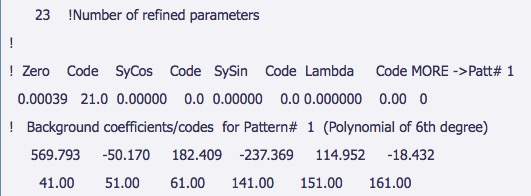
本人参网站自学fullprof. 以Y2O3为例。经过多次精修后,发现Rwp最下只能到13.3,不能达到6%左右。R可以达到3.5%左右。烦请高手指点一下,哪里出了问题。下面附上精修时用到的文件及结果。 精修过程如下: Files needed: y2o3.dat; y2o3.cif Learning Outcomes: This example shows a simple Rietveld refinement of Y2O3 in fullprof. You may have used the same dataset in topas/gsas. 0. Fullprof hasn't been installed by default on your computer. To install it go to: http://www.ill.eu/sites/fullprof/php/downloads.html and select the FullProf_Suite Windows option. Save this file to a temporary folder on your computer then run it. Fullprof will take ~5-10 minutes to install. 1. Create a new folder and copy the data file Y2O3.dat and the Y2O3.cif files into it. Start WinPlotr and press the EdPCR button. Press cif-pcr, select Y2O3.cif and press ok in the window that appears. The next step is to work down each of the buttons. 2. Press General and type in a title. 3. Press Patterns, Data file/peak shape and select the data file Y2O3.dat. Select X,Y,sigma (XYdata) as data format. 3.1 In Refinement/simulation select X-ray; make sure, the correct radiation/wavelength is chosen. 3.2 Pattern calculation/ peak shape: Select e.g. Pseudo-Voigt (scroll to find this); change the Range of calculation to a reasonable cut-off value. Higher values will result in longer calculation times, too low values will lead to poor fits. Try with a value of e.g. 15*FWHM. Compare the result to that using a value of 2*FWHM. 4. Select the Background Type, chose e.g. 6-coefficient polynomial. 5. You can use Excluded Regions to exclude selected 2theta ranges from the refinement. 6. Return to the main EdPCR window and click on Phases. Type in the phase name, e.g. Y2O3. Select the Method of calculation, e.g. Structural Model (Rietveld Method) for Rietveld, Profile matching with constant scale factor for LeBail fits. 7. Press Contribution to patterns and select X-ray. Select Pseudo-Voigt Peak shape. 8. Press Refinement in the main window. Chose an adequate number of Refinement cycles. Start with e.g. 10 cycles. Tick the parameters you want to refine in the different sections of this Refinement menu. Select a reasonable order for refining the parameters and make sure to gradually increase the number of parameters. Selecting too many parameters in one step will lead to divergence of the refinement. Start this refinement by selecting the lattice parameters, profile parameter W, Scale factor (from the "Profile" box) and the first two background polynomial coefficients (in background box). If you are happy with your selection press OK and save the input file (file/save) u into the same folder as the data file. There is no need to close the EdPCR window. N.B. if you don't click save the pcr file will not be updated. 9. It's might be worth going through the pcr file to check all your changes have been made at this stage. In particular check that all three atoms in the cif file (2*Y and 1*O) have been loaded. 10. Press FP in Winplotr, select input and data file. The refinement will start and inform you about the residuals, chi^2 and the parameter with the largest shift in each cycle. Continue with this data set until convergence is reached. If the refinement diverges, think of a different refinement strategy. Click on "OK" while you want to continue refining and "No" when you're happy. 11. You can look at the refinement by zooming in the winplotr window. A right click returns you to an unzoomed picture. 12. After convergence, reload the input file in EdPCR (File/reload). N.B. if you don't do this you won't get the refined values. 13. Visually inspect the refinement result and think of a strategy to improve the fit. Select additional parameters to refine, e.g. U and V and/or more background coefficients. Save the input file and redo the refinement… Continue until you are satisfied with the refinement result. Regularly check the parameter values to identify fit artefacts quickly. If the parameters have physically meaningless values, think of another refinement strategy. Pretty often, a different order of refining the parameters does the trick. Make sure to reset the parameters to reasonable values before trying out a different strategy. 14. Prior to refining asymmetry parameters, open the pcr-file by clicking on the PCR-button in Winplotr. Manually enter a reasonable cut-off 2 theta value for asymmetry-correction below the flag AsyLim (try different values and inspect the refinement results). Save the pcr and return to the EdPCR window. Reload the input file and sequentially start to refine asymmetry parameters. Make sure that your selection of the peak-profile function is compatible with your selection of asymmetry correction. Some profile functions already have an implemented asymmetry correction. 15. Play with the output options to check, what information is obtained. If you want to do some Fourier-map calculation to e.g., find missing atoms, select Patterns output - Structure factors file (FOU) and tick GFOURIER. You can then use the program GFOURIER to calculate different Fourier-maps. 16. If you exclude the 2 theta region between 0 and 16°, you should finally obtain an Rwp of around 6% and a Bragg-R factor for Y2O3 around 3.5%. 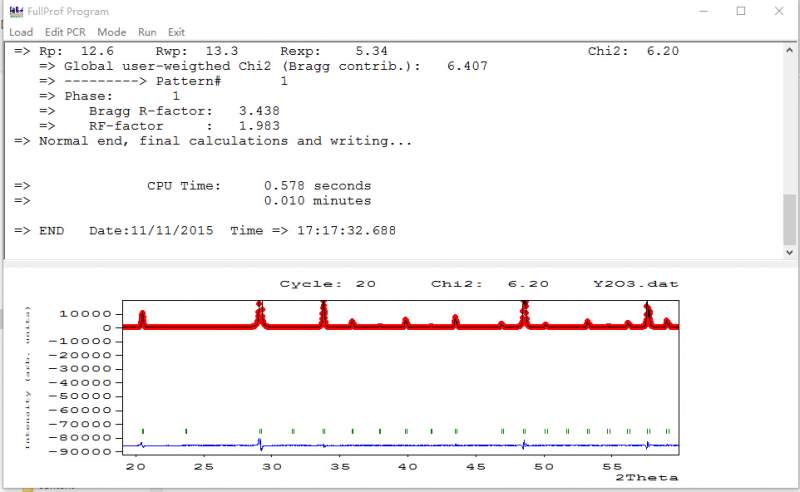 Y2O3.jpg |
 回复此楼
回复此楼» 本帖附件资源列表
-
欢迎监督和反馈:小木虫仅提供交流平台,不对该内容负责。
本内容由用户自主发布,如果其内容涉及到知识产权问题,其责任在于用户本人,如对版权有异议,请联系邮箱:xiaomuchong@tal.com - 附件 1 : Y2O3.dat
- 附件 2 : Y2O3.out
2015-11-11 17:26:43, 150.75 K
2015-11-11 17:26:47, 63.13 K
» 收录本帖的淘帖专辑推荐
 FullProf FullProf |
» 猜你喜欢
 求高校合作
已经有1人回复
求高校合作
已经有1人回复
-
27级无机化学申博自荐
已经有2人回复
-
无机化学论文润色/翻译怎么收费?
已经有106人回复
-
Chemdraw免费软件
已经有0人回复
-
单晶结构解析,各类疑难晶体数据处理和答疑
已经有38人回复
-
这个水相反应有没有催化剂促进发生
已经有4人回复
-
Mn Me3TACN
已经有5人回复
-
求助最新的CCDC数据库升级包
已经有0人回复
-
高中化学教师求助:配合物一水硫酸四氨合铜的紫外可见吸收光谱数据
已经有2人回复
-
ACS omega,返修返回去目前为in peer review,求助进度问题
已经有2人回复
gyliu
铁杆木虫 (职业作家)
- CMEI: 1
- 应助: 335 (大学生)
- 金币: 16377.7
- 散金: 9
- 红花: 128
- 帖子: 3258
- 在线: 513小时
- 虫号: 327449
- 注册: 2007-03-19
- 性别: GG
- 专业: 凝聚态物性I:结构、力学和

2楼2015-11-12 09:10:02
涵源亦可
银虫 (小有名气)
- 应助: 0 (幼儿园)
- 金币: 1008.4
- 散金: 410
- 红花: 6
- 帖子: 283
- 在线: 123.2小时
- 虫号: 3162786
- 注册: 2014-04-25
- 性别: GG
- 专业: 理论和计算化学

3楼2015-11-13 10:06:10
leiws
至尊木虫 (职业作家)
木虫浪子
- 应助: 327 (大学生)
- 金币: 20468.5
- 散金: 1872
- 红花: 62
- 帖子: 3922
- 在线: 2143.7小时
- 虫号: 832300
- 注册: 2009-08-22
- 性别: GG
- 专业: 催化化学


4楼2015-11-13 20:53:31
涵源亦可
银虫 (小有名气)
- 应助: 0 (幼儿园)
- 金币: 1008.4
- 散金: 410
- 红花: 6
- 帖子: 283
- 在线: 123.2小时
- 虫号: 3162786
- 注册: 2014-04-25
- 性别: GG
- 专业: 理论和计算化学
5楼2015-11-13 22:55:36