









| 查看: 3712 | 回复: 6 | |||
ml1409木虫 (小有名气)
|
[交流]
ICEM里block浅蓝色的edge代表什么意思呢?
|

如图中的箭头所示,如果箭头位置上不是蓝色的,而是黑色的,怎么让它变成蓝色的呢?就是让其在体积内。我做的时候不知道怎么就出现黑色的,一直没办法解决,最后重新画才是下图的蓝色的样子。蓝色才是正确的关联。 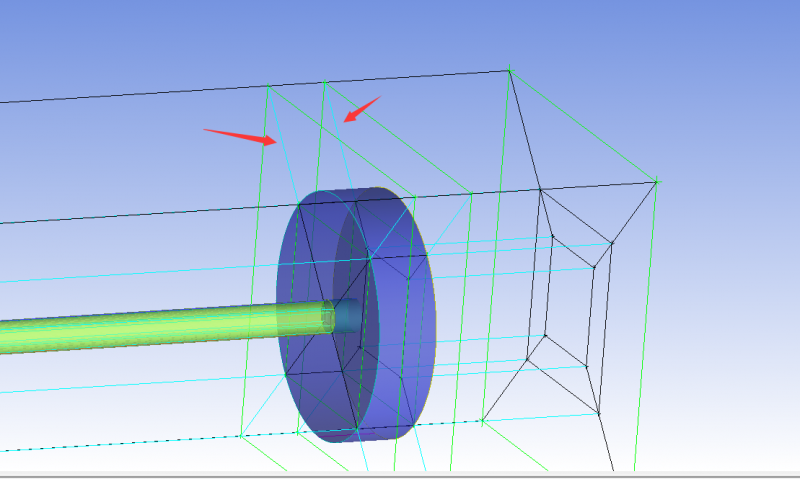 QQ截图20150417112754.png [ Last edited by ml1409 on 2015-4-17 at 15:22 ] |
 回复此楼
回复此楼» 猜你喜欢
 深圳大学应用技术学院招聘凝聚态物理博士后
已经有124人回复
深圳大学应用技术学院招聘凝聚态物理博士后
已经有124人回复
-
求助中医院临床中医中标的青年标书学习,谢谢
已经有5人回复
-
物理学I论文润色/翻译怎么收费?
已经有84人回复
-
浙大物院表面物理课题组长期招收普博及直博学生
已经有259人回复
-
【征稿】Springer Nature热电专题 Discover Materials / Discover Chemistry
已经有47人回复
-
25届硕士申请,材料计算方向
已经有2人回复
-
课题组招1-2名硕士
已经有1人回复
-
机时越来越贵之后,我把一部分 DFT 流程搬到了 AI 计算平台上
已经有0人回复
-
斯坦福大学与Elsevier世界前2%学者新排名查询
已经有1人回复
-
27申博推荐:南京航空航天大学国际前沿院光学方向招收博士生!
已经有19人回复
» 本主题相关价值贴推荐,对您同样有帮助:
- 如图:ICEM里面怎么增加这样的edge?小白着急求指点!急急急!
已经有9人回复
- ICEM选不上Edge
已经有6人回复
- 在学下ICEM时划分c网格遇见的问题
已经有8人回复
- ICEM划分网格的小问题、、、
已经有7人回复
- ICEM网格导入fluent出现的一个问题,自己查了很久都没找出原因,求大神指导
已经有12人回复
- ICEM 网格划分算例求助_2_edit edge
已经有5人回复
- icem中画六面体网格,弧面定义映射需要定义面吗
已经有3人回复
★
ml1409(金币+1): 谢谢参与
ml1409(金币+1): 谢谢参与
 |
2楼2015-04-17 11:57:34
★
ml1409(金币+1): 谢谢参与
ml1409(金币+1): 谢谢参与
| 祝福 |
3楼2015-04-17 12:36:07
|
|
4楼2015-04-17 12:43:05
|
|
5楼2015-04-17 12:44:45
|
|
6楼2015-04-17 12:50:02
ml1409
木虫 (小有名气)
- 应助: 3 (幼儿园)
- 金币: 2979.5
- 散金: 3
- 帖子: 283
- 在线: 83.9小时
- 虫号: 2531990
- 注册: 2013-07-04
- 专业: 化学工程及工业化学
|
自己找到了, 不过还有一个问题就是,如果箭头位置上不是蓝色的,而是黑色的,怎么让它变成蓝色的呢?就是让其在体积内。 White Edges and Vertices These edges are between two material volumes. The edge and the associated vertices will be projected to the closest CAD surface between these material volumes. The vertices of these edges can move only on the surfaces. -------------------------------------------------------------------------------- Note: These display in black if you have chosen a light colored background for the graphics display window. -------------------------------------------------------------------------------- Blue Edges and Vertices These edges are in the volume. The vertices of these edges, also blue, can be moved by selecting the edge just before it and can be dragged on that edge. Green Edges and Vertices These edges and the associated vertices are being projected to curves. The vertices can be moved only on the curve(s) to which they are being projected. Red Vertices These vertices are projected to prescribed points. |

7楼2015-04-17 14:50:14