









| 查看: 2076 | 回复: 17 | ||
huangzx1314禁虫 (知名作家)
|
[求助]
origin软件处理usr格式的数据
|
|

如何用origin将XRD测试的5列数据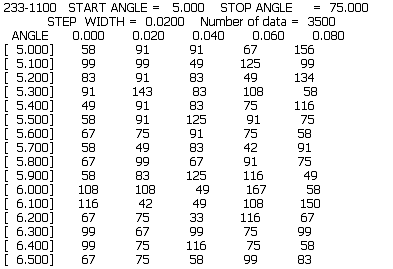 转化为一列的数据(只显示一列衍射角,一列强度)Jade和Origin都打不开啊~~  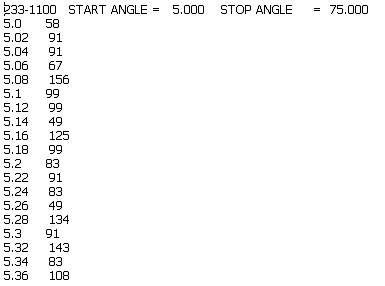 之前处理的USR文件都是两列的,这次不知什么是5列的 ~越详细越好,不胜感激~~ [ Last edited by huangzx1314 on 2011-6-5 at 16:46 ] |
 回复此楼
回复此楼» 猜你喜欢
 申博求助
已经有4人回复
申博求助
已经有4人回复
-
27年申博自荐-能源/环境方向
已经有3人回复
-
闲聊
已经有3人回复
-
亲密关系
已经有13人回复
-
27秋申博自荐
已经有4人回复
» 本主题相关价值贴推荐,对您同样有帮助:
- 安捷伦气质联用谱图能导出TXT格式的数据再用origin做图吗?求教!!!
已经有6人回复
- 【教程】数据处理与绘图软件Origin7.5中文教程
已经有954人回复
- 有关N2等温吸脱附曲线用origin进行数据处理方面的教程
已经有6人回复
- 【求助】zsimpwin 软件拟合图谱的数据如何输出到origin作图?
已经有25人回复
- 【求助】关于origin处理实验数据的问题
已经有14人回复
- 【求助】1个可以提取PDF格式论文中的origin曲线数据软件
已经有9人回复
- 【分享】将Mathematica绘图数据转换至Origin软件
已经有134人回复
- 【求助】origin里怎么改数据格式啊
已经有3人回复
- 如何用Origin软件将AFM三维图片数据重画
已经有7人回复
bible2
版主 (职业作家)
- IN-EPI: 1
- 应助: 545 (博士)
- 贵宾: 0.093
- 金币: 32075.7
- 散金: 1030
- 红花: 175
- 沙发: 1
- 帖子: 4801
- 在线: 2833.9小时
- 虫号: 265520
- 注册: 2006-07-15
- 专业: 无机非金属类光电信息与功
- 管辖: 无机非金属

10楼2011-06-09 20:05:32
bible2
版主 (职业作家)
- IN-EPI: 1
- 应助: 545 (博士)
- 贵宾: 0.093
- 金币: 32075.7
- 散金: 1030
- 红花: 175
- 沙发: 1
- 帖子: 4801
- 在线: 2833.9小时
- 虫号: 265520
- 注册: 2006-07-15
- 专业: 无机非金属类光电信息与功
- 管辖: 无机非金属
2楼2011-06-05 15:02:12
bible2
版主 (职业作家)
- IN-EPI: 1
- 应助: 545 (博士)
- 贵宾: 0.093
- 金币: 32075.7
- 散金: 1030
- 红花: 175
- 沙发: 1
- 帖子: 4801
- 在线: 2833.9小时
- 虫号: 265520
- 注册: 2006-07-15
- 专业: 无机非金属类光电信息与功
- 管辖: 无机非金属
3楼2011-06-05 20:41:28
bible2
版主 (职业作家)
- IN-EPI: 1
- 应助: 545 (博士)
- 贵宾: 0.093
- 金币: 32075.7
- 散金: 1030
- 红花: 175
- 沙发: 1
- 帖子: 4801
- 在线: 2833.9小时
- 虫号: 265520
- 注册: 2006-07-15
- 专业: 无机非金属类光电信息与功
- 管辖: 无机非金属
★
zhangquan8385(金币+1): 应助相当到位 2011-06-18 08:43:12
zhangquan8385(金币+1): 应助相当到位 2011-06-18 08:43:12
|
powderx下载.好象是这个地址. http://www.ccp14.ac.uk/ccp/web-mirrors/powderx/Powder/ |
4楼2011-06-05 20:51:42
bible2
版主 (职业作家)
- IN-EPI: 1
- 应助: 545 (博士)
- 贵宾: 0.093
- 金币: 32075.7
- 散金: 1030
- 红花: 175
- 沙发: 1
- 帖子: 4801
- 在线: 2833.9小时
- 虫号: 265520
- 注册: 2006-07-15
- 专业: 无机非金属类光电信息与功
- 管辖: 无机非金属
5楼2011-06-05 20:52:02
zipperzinc
木虫 (正式写手)
- 应助: 10 (幼儿园)
- 金币: 3443.8
- 散金: 15
- 红花: 9
- 帖子: 574
- 在线: 141.5小时
- 虫号: 1304751
- 注册: 2011-05-24
- 性别: GG
- 专业: 集成电路制造与封装

6楼2011-06-06 09:48:18
atlasxm
木虫 (正式写手)
- 应助: 38 (小学生)
- 金币: 4180.8
- 散金: 425
- 红花: 2
- 帖子: 635
- 在线: 222.7小时
- 虫号: 608648
- 注册: 2008-09-21
- 性别: GG
- 专业: 水泥与耐火材料
7楼2011-06-07 19:59:44
atlasxm
木虫 (正式写手)
- 应助: 38 (小学生)
- 金币: 4180.8
- 散金: 425
- 红花: 2
- 帖子: 635
- 在线: 222.7小时
- 虫号: 608648
- 注册: 2008-09-21
- 性别: GG
- 专业: 水泥与耐火材料
8楼2011-06-08 19:34:37
bible2
版主 (职业作家)
- IN-EPI: 1
- 应助: 545 (博士)
- 贵宾: 0.093
- 金币: 32075.7
- 散金: 1030
- 红花: 175
- 沙发: 1
- 帖子: 4801
- 在线: 2833.9小时
- 虫号: 265520
- 注册: 2006-07-15
- 专业: 无机非金属类光电信息与功
- 管辖: 无机非金属
★
huangzx1314(金币+1): 感谢参与论坛应助~~ 2011-06-09 21:35:36
huangzx1314(金币+1): 感谢参与论坛应助~~ 2011-06-09 21:35:36
|
There are 6 zipped files (disk1.zip - disk5.zip and PXErtf.zip)for PowderX which you can download seperately or as a whole (PXALL.zip). All file can be unzipped using Winzip with the password that I provide to you. You can obtain the password after you send a e-mail with the agreement document as an attached file. after the PXALL.zip is extracted, you get all the files needed. You can set up the PowderX by run "Setup.exe" in the "disk1" subdirectory. !!!Note----Please uninstall the previous version of PowderX first before you setup the new version. PXErtf.zip: The User's Manual for PowderX, English, Word7.0 RTF Format. If you need the User's Manual for PowderX in Chinese, You can download PXrtf.zip, which is in Word7.0 RTF Format. To get the bug fixes and updates information, please don't forget to sign the last page of the user's manual, and send it to the program auther: Dr. Cheng Dong Institute of Physics, Chinese Academy of Sciences P.O. Box 603 Beijing 100080 P.R. China e-mail: chengdon@aphy.iphy.ac.cn |
9楼2011-06-09 19:55:29