













| 查看: 1136 | 回复: 0 | ||
| 【悬赏金币】回答本帖问题,作者wangzhi116将赠送您 10 个金币 | ||
wangzhi116新虫 (小有名气)
|
[求助]
有没同学知道IEEE会议word模板如何插入作者
|
|

|
模板关于插入作者的叙述如下 This template was designed for two affiliations. 1) For author/s of only one affiliation (Heading 3): To change the default, adjust the template as follows. a) Selection (Heading 4): Highlight all author and affiliation lines. b) Change number of columns: Select Format > Columns >Presets > One Column. c) Deletion: Delete the author and affiliation lines for the second affiliation. d) For author/s of more than two affiliations: To change the default, adjust the template as follows. e) Selection: Highlight all author and affiliation lines. f) Change number of columns: Select Format > Columns > Presets > One Column. g) Highlight author and affiliation lines of affiliation 1 and copy this selection. h) Formatting: Insert one hard return immediately after the last character of the last affiliation line. Then paste the copy of affiliation 1. Repeat as necessary for each additional affiliation. i) Reassign number of columns: Place your cursor to the right of the last character of the last affiliation line of an even numbered affiliation (e.g., if there are five affiliations, place your cursor at end of fourth affiliation). Drag the cursor up to highlight all of the above author and affiliation lines. Go to Format > Columns and select “2 Columns”. If you have an odd number of affiliations, the final affiliation will be centered on the page; all previous will be in two columns. 有没有同学操作过 知道如何在论文开头添加作者 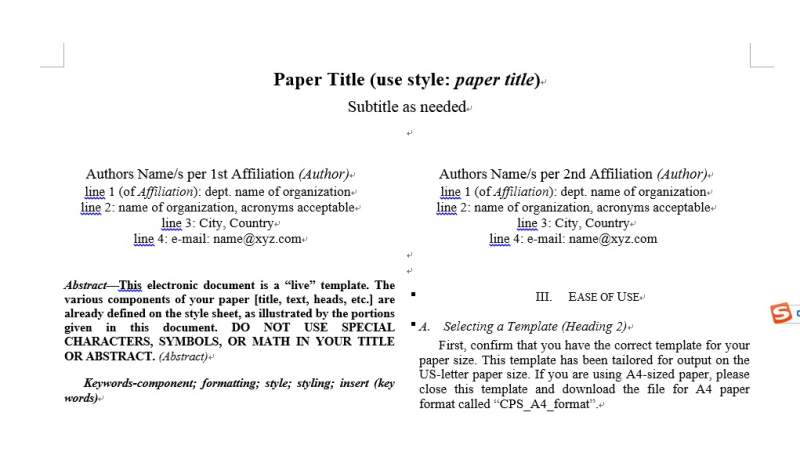 新建位图图像 (2).jpg |
 回复此楼
回复此楼» 猜你喜欢
 一志愿山东大学化学与化工学院材料与化工专硕,360分求调剂
已经有3人回复
一志愿山东大学化学与化工学院材料与化工专硕,360分求调剂
已经有3人回复
-
295求调剂
已经有7人回复
-
312求调剂
已经有5人回复
-
288求调剂 一志愿哈工大 材料与化工
已经有35人回复
-
求老师收留
已经有3人回复
-
化学调剂
已经有7人回复
-
调剂
已经有3人回复
-
315分 085602 求调剂
已经有12人回复
-
271分求调剂学校
已经有6人回复
-
生物学硕341求调剂
已经有3人回复

