









| 查看: 716 | 回复: 0 | ||
| 【悬赏金币】回答本帖问题,作者xinhero将赠送您 10 个金币 | ||
[求助]
文章接收后怎么找不到上传最终版的菜单?
|
||

|
文章接受了,要上传最终电子版,编辑部是这么通知的: To ensure that your manuscript will be in the earliest issue possible, you will need to submit your final electronic files in the correct format to Editorial Manager, using the new 'Production' tab. **First, please read and follow below general instructions carefully before submitting your final manuscript. You must name your files clearly with reference to the manuscript number given above in following convention: ***R1FinalPaper.pdf, ***R1FinalText.docx, ***R1Figures.docx, ***R1Fig#.eps, etc. - do not name the files arbitrarily. **Next, go to https://***.***.com/ and log in as an Author to upload your final files. Under the new 'Production' tab you will see a menu item called Current Task Assignment. You will find your submission record there. 但是我登录进去后根本没有所说的'Production' tab 或Current Task Assignment菜单,怎么回事啊 请大家帮忙看看,谢谢了。附件是登录系统后的界面。 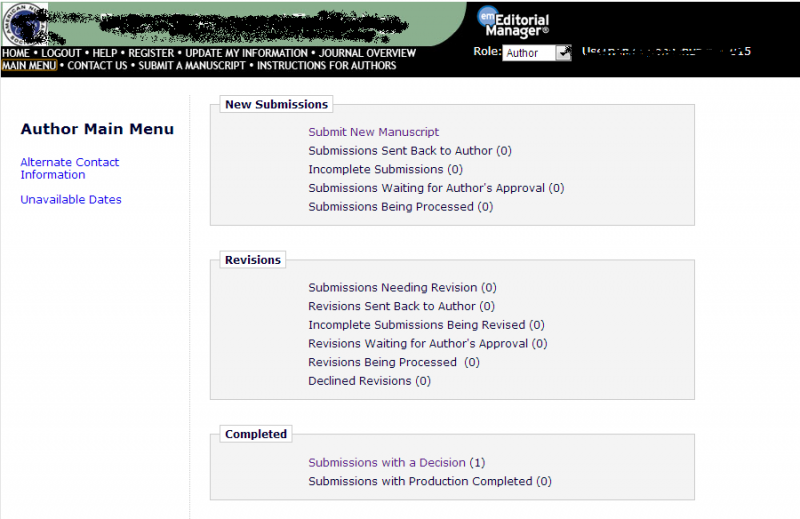 Main Menu.png 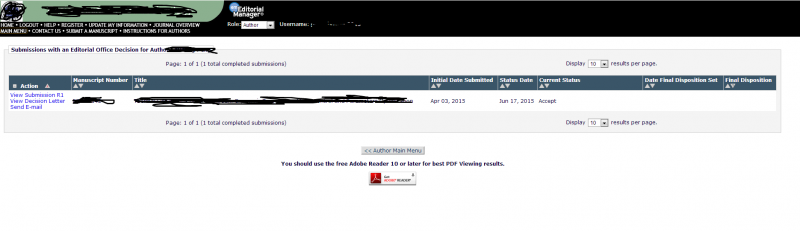 Submissions.png |
 回复此楼
回复此楼» 猜你喜欢
 我应该选哪条合成路线让实验成功率高一些?
已经有8人回复
我应该选哪条合成路线让实验成功率高一些?
已经有8人回复
-
烦躁
已经有8人回复
-
入职后第一次管课题组的专利缴费,对账才发现官费比别人多掏了一倍
已经有3人回复
-
各位大佬,路线设计求助
已经有7人回复

找到一些相关的精华帖子,希望有用哦~
 有没有IEEE signal processing letters双栏和单栏的Latex模板
已经有3人回复
有没有IEEE signal processing letters双栏和单栏的Latex模板
已经有3人回复
- LaTex中公式太长,怎么从双栏变成单栏排版
已经有13人回复
- 文章大修后上传,收到一封编辑错发的邮件,很不淡定了
已经有61人回复
- 附件要上传代表性论文吗?
已经有8人回复
- 如何在latex双栏排版中插入单栏的公式
已经有5人回复
- 文章接收后上传了图片电子文件,编辑部回复称图片不可编辑,请问我该怎么办
已经有18人回复
- 投稿后收到submit的确认邮件,但在author center里的状态栏却找不到记录
已经有6人回复
- 文章被接收后,最终稿件如何上传?
已经有10人回复
- IEEE Trans怎么改成单栏版式?
已经有6人回复
- 英文文章的 表格table 怎么上传?
已经有7人回复
- 求助如何调整图片中的清晰度
已经有17人回复
- 文章附件很大,怎么样将其专门上传到一个开源的永久性的网站
已经有15人回复
- Word 分两栏后在合并成一栏,排版出错了,怎么办?
已经有3人回复
- 小虫投稿时,没法添加学科选项,求助网页如何设置
已经有8人回复
- 文章里的流程图较长,第一栏放不下,如果放第二栏,第一栏就会空出一块,怎么办?
已经有11人回复
- cover letter没有单独提交选项要怎么办
已经有15人回复
- latex转成的pdf文件上传损坏
已经有13人回复
- 投稿上交后发现出来的pdf阅览版和我上传到word不一样怎么办
已经有4人回复
- Elsevier投稿系统中Supplementary (supporting) material 如何上传
已经有5人回复
- 投Bioresource technology 提示 incomplete 该怎么解决
已经有18人回复
- 文章已接收且清样校稿完毕上传,请问多久才正式发表?
已经有4人回复
- 投稿后才发现该期刊要求稿件是单栏,而且行间距是1.5~2倍。没有按这个要求投稿~~~
已经有5人回复
- Copyright签中文名还是英文名
已经有12人回复
- 上传文章时的Comment怎么写?
已经有5人回复
 点击这里搜索更多相关资源
科研从小木虫开始,人人为我,我为人人