






| 查看: 2948 | 回复: 6 | ||
| 当前只显示满足指定条件的回帖,点击这里查看本话题的所有回帖 | ||
lzht1986新虫 (小有名气)
|
[求助]
求教如何用MATLAB在三维图中插入各散点的误差条 已有1人参与
|
|

各位虫友求教一下怎么给这幅三维图中添加散点的误差条,谢谢了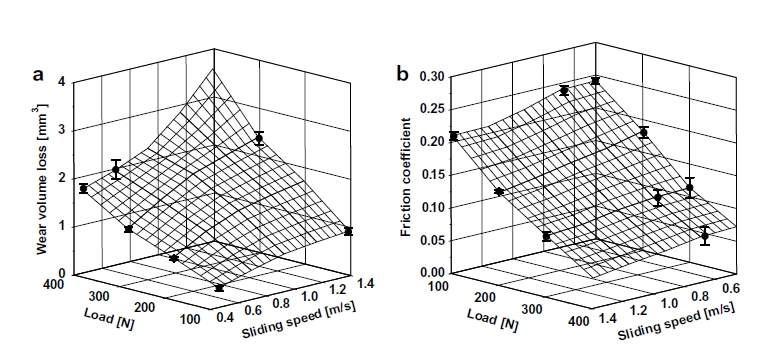 ZLC1)NPXHP$X99Q13)D03SH.jpg |
 回复此楼
回复此楼» 猜你喜欢
 2025年遐想
已经有4人回复
2025年遐想
已经有4人回复
-
投稿Elsevier的杂志(返修),总是在选择OA和subscription界面被踢皮球
已经有8人回复
-
自然科学基金委宣布启动申请书“瘦身提质”行动
已经有4人回复
-
求个博导看看
已经有18人回复
» 本主题相关价值贴推荐,对您同样有帮助:
- 求教这种图怎么用matlab画出来
已经有8人回复
- 求教如何用matlab绘制下面两图
已经有5人回复
- 请问用matlab怎样画下面这幅图?
已经有10人回复
- 请问MATLAB画的图应该怎样输出才能满足投稿要求?
已经有5人回复
- 请问这个图用matlab怎么画
已经有6人回复
- MATLAB图片以eps格式导入ctex,编译不在PDF文档中间,请教高手!!!
已经有6人回复
- 请问matlab是如何画出这样的图,用那个函数?
已经有13人回复
- 求教:matlab中两条曲线之间填充颜色的问题
已经有5人回复
- 重金请教-如何用MAtlab对力学模型进行参数识别
已经有12人回复
- 请问怎么用matlab画出这样的图??
已经有6人回复
- 请问如何用matlab画出下面这个图的图像
已经有6人回复
- 请问如何用Matlab画工作空间的轮廓图
已经有10人回复
- 搞地学的朋友,请问怎么用matlab做Mann-Kendall趋势检验啊?
已经有10人回复
- Matlab如何处理散点与散点之间的误差带
已经有3人回复
- 请教如何用matlab读入emf文件
已经有5人回复
- 新人求指教啊 请问怎么从matlab图中提取600组数据
已经有11人回复
- 请教Matlab图形保存问题
已经有5人回复
- 请问如何用Matlab编程做这个图?谢谢大家!
已经有5人回复
- 请教一个如何调整matlab 画图颜色的问题
已经有5人回复
- 请教个matlab中的rand函数
已经有3人回复
- 【求助】这个MATLAB四维图形如何绘制,请教!!
已经有5人回复
- 【求助】请问matlab编程语言如何打包成为独立的应用程序啊?谢谢
已经有8人回复
- 【求助】请教如何用matlab画出矢量图?
已经有3人回复

 lzht1986
2楼2014-02-11 00:41:18
|
试了一下,发现errorbar最多支持二维图像,重新弄了一下,可以支持三维的了,下边是一个例子,希望对你有帮助。 function Fcn_test clear all close all clc %------------------------ % one example of surface [X,Y] = meshgrid(-2:.2:2, -2:.2:2); Z = X .* exp(-X.^2 - Y.^2); %--------------------- eb_id= [1,1;... 17,6]; % errorbar index of X Y coordinates x_eb_id=X(eb_id(:,1)); % X coordinates of the points with errorbars y_eb_id=Y(eb_id(:,2)); % Y coordinates of the points with errorbars for i=1:length(x_eb_id) z_eb_id(i)=Z(eb_id(i,2),eb_id(i,1)); % Z coordinates of the points with errorbars end eb_E=[0.2,0.2]; % Error figure surf(X,Y,Z) hold on plot3_errorbars_surf(x_eb_id,y_eb_id,z_eb_id,eb_E); %----------------------------------------------- function [h]=plot3_errorbars_surf(x, y, z, e) % this matlab function plots 3d data using the plot3 function % it adds vertical errorbars to each point symmetric around z % I experimented a little with creating the standard horizontal hash % tops the error bars in a 2d plot, but it creates a mess when you % rotate the plot % % x = xaxis, y = yaxis, z = zaxis, e = error value % create the standard 3d scatterplot hold on; h=plot3(x, y, z, '.k'); % looks better with large points set(h, 'MarkerSize', 25); hold on % now draw the vertical errorbar for each point for i=1:length(x) xV = [x(i); x(i)]; yV = [y(i); y(i)]; zMin = z(i) + e(i); zMax = z(i) - e(i); zV = [zMin, zMax]; % draw vertical error bar h=plot3(xV, yV, zV, '-k'); set(h, 'LineWidth', 2); end  res.jpg |
» 本帖已获得的红花(最新10朵)
5楼2014-02-11 02:00:07