









| 查看: 14135 | 回复: 10 | |||
engimar木虫 (正式写手)
|
[求助]
请问:word分栏后如何将行号显示在文档右侧 已有4人参与
|
||

|
各位虫友,请问word分栏以后,如何将行号显示在两侧(如图,这个范文是pdf版本),即左边一栏的行号在文档左边,而右边一栏的行号在文档右侧。 我调了半天,发现行号都在左边,这样一来右边一栏的行号夹在两栏之间完全看不到,⊙﹏⊙b汗 期待指教! 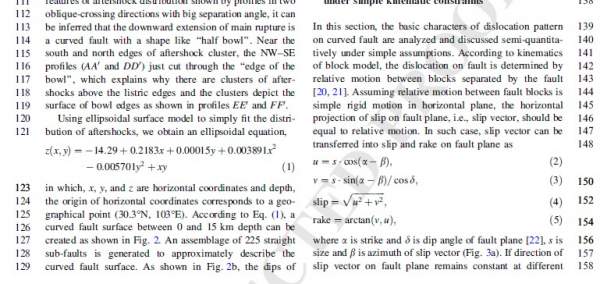 [ Last edited by engimar on 2013-11-1 at 15:43 ] |
 回复此楼
回复此楼» 猜你喜欢
 售SCI文章,我:8O.5.5.1O.54,科目全,可十急
已经有4人回复
售SCI文章,我:8O.5.5.1O.54,科目全,可十急
已经有4人回复
-
售SCI一区T0P文章,我:8O.55.1.O.54,科目全,可伽急
已经有4人回复
-
售SCI一区T0P文章,我:8.O.55.1.O54,科目全,可伽急
已经有4人回复
-
售SCI一区文章,我:8O5.5.1.O5.4,科目全,可伽急
已经有6人回复
-
售SCI一区文章,我:8O5.5.1.O5.4,科目全,可伽急
已经有6人回复
-
售一区SCI文章T0P,我:8O.551.O54,科目全,可十急
已经有4人回复
-
某top大学教授说“能够在市场中兑现的能力才是真能力”无比同意!
已经有13人回复
-
同一个分子,一条来自文献,一条来自AI——不告诉你答案,你会选哪条?
已经有7人回复
-
售SCI文章,我:8O.5.5.1O.54,科目全,可十急
已经有4人回复
-
售SCI一区T0P文章,我:8.O.55.1.O54,科目全,可伽急
已经有4人回复
» 本主题相关价值贴推荐,对您同样有帮助:
- word07分栏后图形图像无法显示
已经有3人回复
- word文档分栏后,里面的mathtype公式和编号不随着变化
已经有3人回复
- word分栏后脚注的问题
已经有3人回复
- 关于word分栏及图片 (WORD2010)
已经有7人回复
- 如何将EndNote X4插入Word2010中的文献分栏
已经有2人回复
- [求助]word中的分栏问题
已经有7人回复
- word2007中分栏
已经有7人回复
- 求助:word文档中分栏问题
已经有14人回复
【答案】应助回帖
|
国外有个大佬解决了这个问题,我试了一下,执行了1-4步,页码就到左边了 https://superuser.com/questions/ ... n-odd-pages-in-word 1、Open the document that you'd like your line numbers to be right-aligned in. 2、Under "Page Layout" (Word 2013) enable Line Numbers for your document. 3、Use Alt+F11 to open VBE. 4、Paste the following code in the "Immediate Window". If the Immediate Window is not visible (most likely at the bottom of your screen), enable it using Ctrl+G. ActiveDocument.Sections(1).PageSetup.SectionDirection = wdSectionDirectionRtr 5、Hit the "Enter" key on your keyboard to run this script. Do Not click the Run Macro button in the toolbar, use the enter key. 6、Save and close your document. Your line numbers may have vanished, that's fine. 7、Click Start > All Programs > Microsoft Office > Microsoft Office Tools > Microsoft Office XXXX Language Settings/Preferences 8、Select "Hebrew" in the Available Editing Languages box. 9、Click "Add" then click "Ok". 10、Reopen your Word document. Your line-numbers should be on the right margin of your document. If not then look under Paragraph options and adjust the (section) direction to right-to-left. Do not forget to go back to languages preferences and remove Hebrew after you get your printed documents, but beware that doing so before you've printed it will result in the line numbers being removed. This is based on this document which I tested successfully prior to using as an answer.  |


9楼2021-05-25 19:04:11
fannis
金虫 (正式写手)
- 应助: 7 (幼儿园)
- 金币: 1118.3
- 散金: 231
- 红花: 8
- 帖子: 377
- 在线: 126小时
- 虫号: 1954080
- 注册: 2012-08-24
- 性别: GG
- 专业: 食品科学基础
2楼2013-11-01 16:28:39
3楼2018-07-08 09:01:20
4楼2018-10-26 15:09:30
xylz6188
铁杆木虫 (著名写手)
- 应助: 8 (幼儿园)
- 金币: 6159.1
- 散金: 489
- 红花: 29
- 帖子: 1589
- 在线: 408.2小时
- 虫号: 761930
- 注册: 2009-05-02
- 性别: GG
- 专业: 理论和计算化学
5楼2018-10-28 09:43:09
wyx411
木虫 (著名写手)
- 应助: 7 (幼儿园)
- 金币: 5787.1
- 散金: 905
- 红花: 6
- 帖子: 1483
- 在线: 180.6小时
- 虫号: 1673976
- 注册: 2012-03-07
- 性别: GG
- 专业: 胶体与界面化学
6楼2019-01-29 15:45:21

7楼2020-03-08 21:04:18
【答案】应助回帖
|
我也遇到了后面这个问题,投搞想给论文加上行号,但是右侧栏的行号会被挡住。 查了一圈都没发现lz说的解决方案,估计这在word里行不通,可能图里使用的latex吧,后面我是这样“解决”的。 首先,进入word中的 布局 - 页面设置 - 行号,在弹出的对话框中点击行号,在弹出的第二个对话框中设置行号“距正文”的值,把他设置小一点,例如0.1cm。 然后,点击样式中右下角的箭头,点击选项 选择显示所有样式 并确定,然后在样式里找“行号”,右键修改,把他字体改小,例如5号字体。 完成,现在可以清晰的看到行号了  参考: https://superuser.com/questions/1518537/line-numbering-in-word-365-counts-the-line-in-second-column-but-do-not-display-t https://zhuanlan.zhihu.com/p/40568388 |
8楼2020-10-24 22:49:12
10楼2021-05-25 19:06:33

