









| 查看: 1936 | 回复: 1 | ||
[求助]
怎么设置legend使其一半虚线一半实线? 已有1人参与
|

如图片所示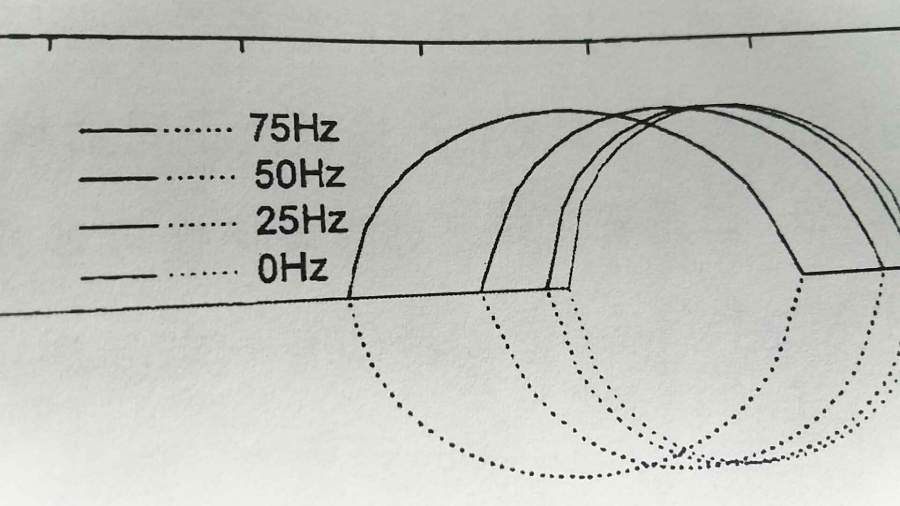 发自小木虫Android客户端 |
 回复此楼
回复此楼» 猜你喜欢
 40+中年人失业后,还能找到好工作吗?
已经有11人回复
40+中年人失业后,还能找到好工作吗?
已经有11人回复
-
用NBS溴化时溶剂除了CCl4外还有什么
已经有6人回复
-
申请科研项目纯靠实力能成功吗?
已经有11人回复
-
极限拉扯,如何抉择
已经有15人回复
-
二审4个多月了还是Awaiting Reviewer Scores
已经有4人回复
-
OpenAI又攻克数学难题了,离AI做有机合成还有多远?
已经有13人回复
-
课题组会帮你通过考核么?
已经有7人回复
-
售一区SCI文章T0P,我:8O.551.O54,科目全,可十急
已经有9人回复
-
售SCI一区文章,我:8O5.5.1.O5.4,科目全,可伽急
已经有10人回复
-
售SCI一区T0P文章,我:8.O55.1.O.54,科目全,可十急
已经有8人回复
Jeromelei
银虫 (初入文坛)
- 应助: 1 (幼儿园)
- 金币: 817.9
- 帖子: 18
- 在线: 11.9小时
- 虫号: 4204365
- 注册: 2015-11-08
- 专业: 影像医学与生物医学工程
【答案】应助回帖
★ ★ ★
感谢参与,应助指数 +1
jjdg: 金币+3, 感谢参与 2017-08-23 12:00:47
感谢参与,应助指数 +1
jjdg: 金币+3, 感谢参与 2017-08-23 12:00:47
|
Assume you use matlab % Generate an example input data dt = 0.0001; t = -0.05 : dt : 0.05; t0 = 0 : dt : 1/150; f75Hz_p = [zeros(1, length(t(1) : dt : t0(1) - dt)), sin(2*pi*75*t0), zeros(1, length(t0(end) + dt : dt : t(end)))]; f75Hz_n = -[zeros(1, length(t(1) : dt : t0(1) - dt)), sin(2*pi*75*t0), zeros(1, length(t0(end) + dt : dt : t(end)))]; % Plot the data without any legend figure(1); plot(t, f75Hz_p, 'k-'); hold on; plot(t, f75Hz_n, 'k:'); % By default, Matlab does not provide the legend property you want % Therefore, you could use annotation textarrow property instead % x and y are original positions for the textarrow, dx is used for % incremental length of the textarrow x = 0.15; y = 0.8; dx = 0.1; % Drawing (headless) text arrows, so that one of them can have % a string properly which is your legend entry label. Use x,y,dx % for positioning annotation('textarrow', [x,x+dx], [y,y], ... 'linestyle', '-', 'color', 'k', 'textcolor', 'k', 'headstyle', 'none') annotation('textarrow', [x+dx+0.005, x+2*dx+0.005], [y,y], ... 'linestyle', ':', 'color', 'k', 'textcolor', 'k', 'headstyle', 'none') annotation('textarrow', [x + 2*dx + 0.07, x + 3*dx], [y y], ... 'linestyle', 'none', 'textcolor', 'k', 'headstyle', 'none', 'string', '75Hz') |

2楼2017-08-23 03:38:31


 200
200