









| 查看: 2017 | 回复: 1 | ||
| 本帖产生 1 个 博学EPI ,点击这里进行查看 | ||
一方水土木虫 (小有名气)
|
[求助]
load data input output的使用
|
|

|
我在写MATLAB程序时,用到 load data input output ;可是我不清楚这个input 和output的数据从哪输入,忘大神给指点迷津,那个data.mat文件是怎么回事啊? 下面我附上部分程序: 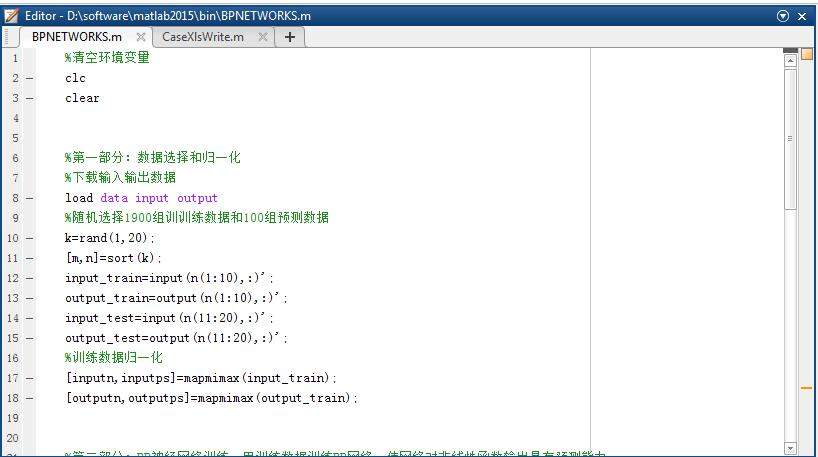 part.jpg |
 回复此楼
回复此楼» 猜你喜欢
 应该是93bebmhtak前后十一个字符比较关键
已经有35人回复
应该是93bebmhtak前后十一个字符比较关键
已经有35人回复
-
长年满屏的广告,版主太不责任了。基金也等的急
已经有3人回复
-
filecode
已经有12人回复
-
不应该看fileCode
已经有4人回复
-
FileCode能看出啥?
已经有19人回复
-
2019年青年基金涵评意见,大家看看几个A,几个B?
已经有5人回复
-
职称评审,求友友推荐见刊最快的期刊
已经有4人回复
-
奇怪,两个人的filecode固定段从头到尾一模一样
已经有10人回复
-
综述论文作为代表作会不会影响评审专家的印象分?
已经有13人回复
-
是这周出结果还是下周出结果?
已经有3人回复

FMStation
至尊木虫 (知名作家)
- 博学EPI: 15
- 应助: 591 (博士)
- 贵宾: 0.03
- 金币: 18701.7
- 红花: 97
- 帖子: 8891
- 在线: 1493.2小时
- 虫号: 2400059
- 注册: 2013-04-04
- 专业: 计算机应用技术
【答案】应助回帖
★ ★ ★ ★ ★
一方水土: 金币+5, 博学EPI+1, ★有帮助 2016-09-27 15:30:47
一方水土: 金币+5, 博学EPI+1, ★有帮助 2016-09-27 15:30:47
|
http://matlab.izmiran.ru/help/techdoc/matlab_prog/ch10_in8.html To import variables from a binary or ASCII file on your disk to your workspace, use the load function. You can load all variables from the workspace in a single operation (if you omit the filename, MATLAB loads from file matlab.mat): load filename or load just those variables that you specify: load filename var1 var2 ... varN Use the wildcard character (*) in the variable name to load those variables that match a specific pattern. (This works for MAT-files only.) For example, the following command loads all variables that start with str from file strinfo.mat: load strinfo str* ~~~~~ input_train input[1]..[10] input_test input[11]..[20] output_train output[1]..[10] output_test output[11]..[20] |

2楼2016-09-26 18:07:47
