









| 查看: 1682 | 回复: 0 | |||
[交流]
ROS-topic
|

|
重新roscore $ roscore run node $ rosrun turtlesim turtlesim_node 键盘控制乌龟移动,要启动这个terminal乌龟才会动 $ rosrun turtlesim turtle_teleop_key 、 用rqt-graph查看topic 如果没安装,先安装 $ sudo apt-get install ros-<distro>-rqt $ sudo apt-get install ros-<distro>-rqt-common-plugins 然后 In a new terminal: $ rosrun rqt_graph rqt_graph 可以看到类似下面的 $ rostopic -h rostopic bw display bandwidth used by topic rostopic echo print messages to screen rostopic hz display publishing rate of topic rostopic list print information about active topics rostopic pub publish data to topic rostopic type print topic type rostopic echo: rostopic echo [topic] $ rostopic echo /turtle1/cmd_vel 移动小乌龟,会出现下面的 angular: x: 0.0 y: 0.0 z: -2.0 --- linear: x: 0.0 y: 0.0 z: 0.0 angular: x: 0.0 y: 0.0 z: -2.0 --- linear: x: 0.0 y: 0.0 z: 0.0 angular: x: 0.0 y: 0.0 z: -2.0 刷新graph页面,多了一个topic $ rostopic list -h Usage: rostopic list [/topic] Options: -h, --help show this help message and exit -b BAGFILE, --bag=BAGFILE list topics in .bag file -v, --verbose list full details about each topic -p list only publishers -s list only subscribers For rostopic list use the verbose option: $ rostopic list -v This displays a verbose list of topics to publish to and subscribe to and their type. Published topics: * /turtle1/color_sensor [turtlesim/Color] 1 publisher * /turtle1/command_velocity [turtlesim/Velocity] 1 publisher * /rosout [roslib/Log] 2 publishers * /rosout_agg [roslib/Log] 1 publisher * /turtle1/pose [turtlesim/Pose] 1 publisher Subscribed topics: * /turtle1/command_velocity [turtlesim/Velocity] 1 subscriber * /rosout [roslib/Log] 1 subscriber 4,将消息应用到主题上 I,rostopic pub [topic] [msg_type] [args] 将数据发布到当前主题上,例如小海龟例子: $ rostopic pub -1 /turtle1/cmd_vel geometry_msgs/Twist -- '[2.0, 0.0, 0.0]' '[0.0, 0.0, 1.8]' 命令诠释: rostopic pub ---在给定主题上发布消息 -1 ---此选项表示rostopic只发布一个消息,然后退出 /turtle1/cmd_vel ---给定的主题名 geometry_msgs/Twist ---在给定主题上发布的消息类型 -- ---双负号,表示词法选择器在此后的参数都不可用。这种情况发生在错误参数比如负数 '[2.0, 0.0, 0.0]' '[0.0, 0.0, 1.8]' --- In this case, '[2.0, 0.0, 0.0]' becomes the linear value with x=2.0, y=0.0, and z=0.0, and '[0.0, 0.0, 1.8]' is the angular value with x=0.0, y=0.0, and z=1.8. 让小乌龟一直移动,加一个-r 1,让其保持1hz频率 $ rostopic pub /turtle1/cmd_vel geometry_msgs/Twist -r 1 -- '[2.0, 0.0, 0.0]' '[0.0, 0.0, -1.8]' 获得当前的速率 rostopic hz [topic] Let's see how fast the turtlesim_node is publishing /turtle1/pose: $ rostopic hz /turtle1/pose plot显示 $ rosrun rqt_plot rqt_plot 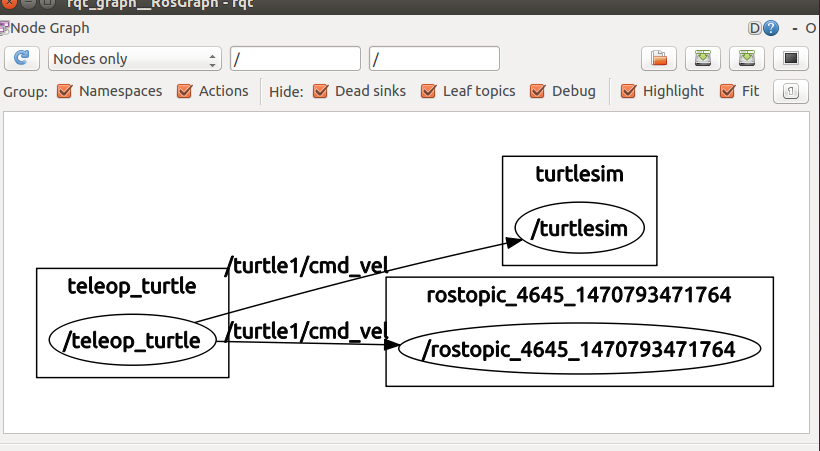 1111.png 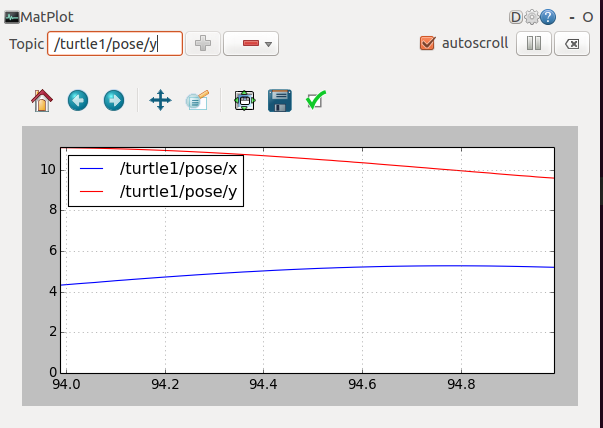 22222.png |
 回复此楼
回复此楼» 猜你喜欢
 售SCI一区T0P文章,我:8.O.55.1.O.5.4,科目全,可+急
已经有5人回复
售SCI一区T0P文章,我:8.O.55.1.O.5.4,科目全,可+急
已经有5人回复
-
售SCI一区T0P文章,我:8O.55.1.O.5.4,科目齐全,可+急
已经有3人回复
-
售SCI一区文章,我:8.O.551.O.5.4,科目全,可伽急
已经有8人回复
-
售SCI一区T0P文章,我:8.O55.1.O.54,科目全,可十急
已经有11人回复
-
售SCI一区T0P文章,我:8O.55.1.O.54,科目全,可伽急
已经有9人回复
-
售SCI一区T0P文章,我:8O.55.1.O.54,科目全,可伽急
已经有5人回复
-
售SCI一区文章,我:8O5.5.1.O5.4,科目全,可伽急
已经有4人回复
-
售SCI一区文章,我:8O5.5.1.O5.4,科目全,可伽急
已经有4人回复
-
售SCI一区T0P文章,我:8.O.55.1.O.54,科目齐全,可+急
已经有6人回复
-
售SCI-T0P文章,我:8O.5.5.1.O.54,科目齐全,可+急
已经有4人回复
