【答案】应助回帖
★ ★ ★ ★ ★ ★ ★ ★ ★ ★ ★ ★ ★ ★ ★ ★ ★ ★ ★ ★ ★ ★ ★ ★ ★ ★ ★ ★ ★ ★ ★ ★ ★ ★ ★ ★ ★ ★ ★ ★ ★ ★ ★ ★ ★ ★ ★ ★ ★ ★ ★ ★ ... 感谢参与,应助指数 +1 wei10: 金币+100, ★★★★★ 最佳答案, 最近忙着毕业的事,回复晚了,非常感谢版主!!! 2016-05-25 11:47:05
说三个事情,其一:
f=@(l,x,t)(-135.4376*(-26.29682+0.03645*t)(58325(1-x)-(58325*x*s)^2/(-0.03753273+0.00173326*t))/s*z);
这段代码中:(-26.29682+0.03645*t)(58325(1-x)-... 括号之间缺少运算符号,这在MATLAB中肯定会报错的,我默认缺少的运算符号为乘号*,并据此修改。
其二:
MATLAB有自带的龙格库塔法函数,四阶精度的程序代码如下:
直接调用即可,没必要自己编程(除非有要求自己写出龙格库塔法的程序),一般个人依据基本算法原理编出的程序是远远不及MATLAB附带程序的。CODE: function varargout = ode45(ode,tspan,y0,options,varargin)
%ODE45 Solve non-stiff differential equations, medium order method.
% [TOUT,YOUT] = ODE45(ODEFUN,TSPAN,Y0) with TSPAN = [T0 TFINAL] integrates
% the system of differential equations y' = f(t,y) from time T0 to TFINAL
% with initial conditions Y0. ODEFUN is a function handle. For a scalar T
% and a vector Y, ODEFUN(T,Y) must return a column vector corresponding
% to f(t,y). Each row in the solution array YOUT corresponds to a time
% returned in the column vector TOUT. To obtain solutions at specific
% times T0,T1,...,TFINAL (all increasing or all decreasing), use TSPAN =
% [T0 T1 ... TFINAL].
%
% [TOUT,YOUT] = ODE45(ODEFUN,TSPAN,Y0,OPTIONS) solves as above with default
% integration properties replaced by values in OPTIONS, an argument created
% with the ODESET function. See ODESET for details. Commonly used options
% are scalar relative error tolerance 'RelTol' (1e-3 by default) and vector
% of absolute error tolerances 'AbsTol' (all components 1e-6 by default).
% If certain components of the solution must be non-negative, use
% ODESET to set the 'NonNegative' property to the indices of these
% components.
%
% ODE45 can solve problems M(t,y)*y' = f(t,y) with mass matrix M that is
% nonsingular. Use ODESET to set the 'Mass' property to a function handle
% MASS if MASS(T,Y) returns the value of the mass matrix. If the mass matrix
% is constant, the matrix can be used as the value of the 'Mass' option. If
% the mass matrix does not depend on the state variable Y and the function
% MASS is to be called with one input argument T, set 'MStateDependence' to
% 'none'. ODE15S and ODE23T can solve problems with singular mass matrices.
%
% [TOUT,YOUT,TE,YE,IE] = ODE45(ODEFUN,TSPAN,Y0,OPTIONS) with the 'Events'
% property in OPTIONS set to a function handle EVENTS, solves as above
% while also finding where functions of (T,Y), called event functions,
% are zero. For each function you specify whether the integration is
% to terminate at a zero and whether the direction of the zero crossing
% matters. These are the three column vectors returned by EVENTS:
% [VALUE,ISTERMINAL,DIRECTION] = EVENTS(T,Y). For the I-th event function:
% VALUE(I) is the value of the function, ISTERMINAL(I)=1 if the integration
% is to terminate at a zero of this event function and 0 otherwise.
% DIRECTION(I)=0 if all zeros are to be computed (the default), +1 if only
% zeros where the event function is increasing, and -1 if only zeros where
% the event function is decreasing. Output TE is a column vector of times
% at which events occur. Rows of YE are the corresponding solutions, and
% indices in vector IE specify which event occurred.
%
% SOL = ODE45(ODEFUN,[T0 TFINAL],Y0...) returns a structure that can be
% used with DEVAL to evaluate the solution or its first derivative at
% any point between T0 and TFINAL. The steps chosen by ODE45 are returned
% in a row vector SOL.x. For each I, the column SOL.y(:,I) contains
% the solution at SOL.x(I). If events were detected, SOL.xe is a row vector
% of points at which events occurred. Columns of SOL.ye are the corresponding
% solutions, and indices in vector SOL.ie specify which event occurred.
%
% Example
% [t,y]=ode45(@vdp1,[0 20],[2 0]);
% plot(t,y(:,1));
% solves the system y' = vdp1(t,y), using the default relative error
% tolerance 1e-3 and the default absolute tolerance of 1e-6 for each
% component, and plots the first component of the solution.
%
% Class support for inputs TSPAN, Y0, and the result of ODEFUN(T,Y):
% float: double, single
%
% See also
% other ODE solvers: ODE23, ODE113, ODE15S, ODE23S, ODE23T, ODE23TB
% implicit ODEs: ODE15I
% options handling: ODESET, ODEGET
% output functions: ODEPLOT, ODEPHAS2, ODEPHAS3, ODEPRINT
% evaluating solution: DEVAL
% ODE examples: RIGIDODE, BALLODE, ORBITODE
% function handles: FUNCTION_HANDLE
%
% NOTE:
% The interpretation of the first input argument of the ODE solvers and
% some properties available through ODESET have changed in MATLAB 6.0.
% Although we still support the v5 syntax, any new functionality is
% available only with the new syntax. To see the v5 help, type in
% the command line
% more on, type ode45, more off
% NOTE:
% This portion describes the v5 syntax of ODE45.
%
% [T,Y] = ODE45('F',TSPAN,Y0) with TSPAN = [T0 TFINAL] integrates the
% system of differential equations y' = F(t,y) from time T0 to TFINAL with
% initial conditions Y0. 'F' is a string containing the name of an ODE
% file. Function F(T,Y) must return a column vector. Each row in
% solution array Y corresponds to a time returned in column vector T. To
% obtain solutions at specific times T0, T1, ..., TFINAL (all increasing
% or all decreasing), use TSPAN = [T0 T1 ... TFINAL].
%
% [T,Y] = ODE45('F',TSPAN,Y0,OPTIONS) solves as above with default
% integration parameters replaced by values in OPTIONS, an argument
% created with the ODESET function. See ODESET for details. Commonly
% used options are scalar relative error tolerance 'RelTol' (1e-3 by
% default) and vector of absolute error tolerances 'AbsTol' (all
% components 1e-6 by default).
%
% [T,Y] = ODE45('F',TSPAN,Y0,OPTIONS,P1,P2,...) passes the additional
% parameters P1,P2,... to the ODE file as F(T,Y,FLAG,P1,P2,...) (see
% ODEFILE). Use OPTIONS = [] as a place holder if no options are set.
%
% It is possible to specify TSPAN, Y0 and OPTIONS in the ODE file (see
% ODEFILE). If TSPAN or Y0 is empty, then ODE45 calls the ODE file
% [TSPAN,Y0,OPTIONS] = F([],[],'init') to obtain any values not supplied
% in the ODE45 argument list. Empty arguments at the end of the call list
% may be omitted, e.g. ODE45('F').
%
% ODE45 can solve problems M(t,y)*y' = F(t,y) with a mass matrix M that is
% nonsingular. Use ODESET to set Mass to 'M', 'M(t)', or 'M(t,y)' if the
% ODE file is coded so that F(T,Y,'mass') returns a constant,
% time-dependent, or time- and state-dependent mass matrix, respectively.
% The default value of Mass is 'none'. ODE15S and ODE23T can solve problems
% with singular mass matrices.
%
% [T,Y,TE,YE,IE] = ODE45('F',TSPAN,Y0,OPTIONS) with the Events property in
% OPTIONS set to 'on', solves as above while also locating zero crossings
% of an event function defined in the ODE file. The ODE file must be
% coded so that F(T,Y,'events') returns appropriate information. See
% ODEFILE for details. Output TE is a column vector of times at which
% events occur, rows of YE are the corresponding solutions, and indices in
% vector IE specify which event occurred.
%
% See also ODEFILE
% ODE45 is an implementation of the explicit Runge-Kutta (4,5) pair of
% Dormand and Prince called variously RK5(4)7FM, DOPRI5, DP(4,5) and DP54.
% It uses a "free" interpolant of order 4 communicated privately by
% Dormand and Prince. Local extrapolation is done.
% Details are to be found in The MATLAB ODE Suite, L. F. Shampine and
% M. W. Reichelt, SIAM Journal on Scientific Computing, 18-1, 1997.
% Mark W. Reichelt and Lawrence F. Shampine, 6-14-94
% Copyright 1984-2009 The MathWorks, Inc.
% $Revision: 5.74.4.10 $ $Date: 2009/04/21 03:24:15 $
solver_name = 'ode45';
% Check inputs
if nargin < 4
options = [];
if nargin < 3
y0 = [];
if nargin < 2
tspan = [];
if nargin < 1
error('MATLAB:ode45:NotEnoughInputs',...
'Not enough input arguments. See ODE45.');
end
end
end
end
% Stats
nsteps = 0;
nfailed = 0;
nfevals = 0;
% Output
FcnHandlesUsed = isa(ode,'function_handle');
output_sol = (FcnHandlesUsed && (nargout==1)); % sol = odeXX(...)
output_ty = (~output_sol && (nargout > 0)); % [t,y,...] = odeXX(...)
% There might be no output requested...
sol = []; f3d = [];
if output_sol
sol.solver = solver_name;
sol.extdata.odefun = ode;
sol.extdata.options = options;
sol.extdata.varargin = varargin;
end
% Handle solver arguments
[neq, tspan, ntspan, next, t0, tfinal, tdir, y0, f0, odeArgs, odeFcn, ...
options, threshold, rtol, normcontrol, normy, hmax, htry, htspan, dataType] = ...
odearguments(FcnHandlesUsed, solver_name, ode, tspan, y0, options, varargin);
nfevals = nfevals + 1;
% Handle the output
if nargout > 0
outputFcn = odeget(options,'OutputFcn',[],'fast');
else
outputFcn = odeget(options,'OutputFcn',@odeplot,'fast');
end
outputArgs = {};
if isempty(outputFcn)
haveOutputFcn = false;
else
haveOutputFcn = true;
outputs = odeget(options,'OutputSel',1:neq,'fast');
if isa(outputFcn,'function_handle')
% With MATLAB 6 syntax pass additional input arguments to outputFcn.
outputArgs = varargin;
end
end
refine = max(1,odeget(options,'Refine',4,'fast'));
if ntspan > 2
outputAt = 'RequestedPoints'; % output only at tspan points
elseif refine <= 1
outputAt = 'SolverSteps'; % computed points, no refinement
else
outputAt = 'RefinedSteps'; % computed points, with refinement
S = (1:refine-1) / refine;
end
printstats = strcmp(odeget(options,'Stats','off','fast'),'on');
% Handle the event function
[haveEventFcn,eventFcn,eventArgs,valt,teout,yeout,ieout] = ...
odeevents(FcnHandlesUsed,odeFcn,t0,y0,options,varargin);
% Handle the mass matrix
[Mtype, M, Mfun] = odemass(FcnHandlesUsed,odeFcn,t0,y0,options,varargin);
if Mtype > 0 % non-trivial mass matrix
Msingular = odeget(options,'MassSingular','no','fast');
if strcmp(Msingular,'maybe')
warning('MATLAB:ode45:MassSingularAssumedNo',['ODE45 assumes ' ...
'MassSingular is ''no''. See ODE15S or ODE23T.']);
elseif strcmp(Msingular,'yes')
error('MATLAB:ode45:MassSingularYes',...
['MassSingular cannot be ''yes'' for this solver. See ODE15S '...
' or ODE23T.']);
end
% Incorporate the mass matrix into odeFcn and odeArgs.
[odeFcn,odeArgs] = odemassexplicit(FcnHandlesUsed,Mtype,odeFcn,odeArgs,Mfun,M);
f0 = feval(odeFcn,t0,y0,odeArgs{:});
nfevals = nfevals + 1;
end
% Non-negative solution components
idxNonNegative = odeget(options,'NonNegative',[],'fast');
nonNegative = ~isempty(idxNonNegative);
if nonNegative % modify the derivative function
[odeFcn,thresholdNonNegative] = odenonnegative(odeFcn,y0,threshold,idxNonNegative);
f0 = feval(odeFcn,t0,y0,odeArgs{:});
nfevals = nfevals + 1;
end
t = t0;
y = y0;
% Allocate memory if we're generating output.
nout = 0;
tout = []; yout = [];
if nargout > 0
if output_sol
chunk = min(max(100,50*refine), refine+floor((2^11)/neq));
tout = zeros(1,chunk,dataType);
yout = zeros(neq,chunk,dataType);
f3d = zeros(neq,7,chunk,dataType);
else
if ntspan > 2 % output only at tspan points
tout = zeros(1,ntspan,dataType);
yout = zeros(neq,ntspan,dataType);
else % alloc in chunks
chunk = min(max(100,50*refine), refine+floor((2^13)/neq));
tout = zeros(1,chunk,dataType);
yout = zeros(neq,chunk,dataType);
end
end
nout = 1;
tout(nout) = t;
yout(:,nout) = y;
end
% Initialize method parameters.
pow = 1/5;
A = [1/5, 3/10, 4/5, 8/9, 1, 1];
B = [
1/5 3/40 44/45 19372/6561 9017/3168 35/384
0 9/40 -56/15 -25360/2187 -355/33 0
0 0 32/9 64448/6561 46732/5247 500/1113
0 0 0 -212/729 49/176 125/192
0 0 0 0 -5103/18656 -2187/6784
0 0 0 0 0 11/84
0 0 0 0 0 0
];
E = [71/57600; 0; -71/16695; 71/1920; -17253/339200; 22/525; -1/40];
f = zeros(neq,7,dataType);
hmin = 16*eps(t);
if isempty(htry)
% Compute an initial step size h using y'(t).
absh = min(hmax, htspan);
if normcontrol
rh = (norm(f0) / max(normy,threshold)) / (0.8 * rtol^pow);
else
rh = norm(f0 ./ max(abs(y),threshold),inf) / (0.8 * rtol^pow);
end
if absh * rh > 1
absh = 1 / rh;
end
absh = max(absh, hmin);
else
absh = min(hmax, max(hmin, htry));
end
f(:,1) = f0;
% Initialize the output function.
if haveOutputFcn
feval(outputFcn,[t tfinal],y(outputs),'init',outputArgs{:});
end
% THE MAIN LOOP
done = false;
while ~done
% By default, hmin is a small number such that t+hmin is only slightly
% different than t. It might be 0 if t is 0.
hmin = 16*eps(t);
absh = min(hmax, max(hmin, absh)); % couldn't limit absh until new hmin
h = tdir * absh;
% Stretch the step if within 10% of tfinal-t.
if 1.1*absh >= abs(tfinal - t)
h = tfinal - t;
absh = abs(h);
done = true;
end
% LOOP FOR ADVANCING ONE STEP.
nofailed = true; % no failed attempts
while true
hA = h * A;
hB = h * B;
f(:,2) = feval(odeFcn,t+hA(1),y+f*hB(:,1),odeArgs{:});
f(:,3) = feval(odeFcn,t+hA(2),y+f*hB(:,2),odeArgs{:});
f(:,4) = feval(odeFcn,t+hA(3),y+f*hB(:,3),odeArgs{:});
f(:,5) = feval(odeFcn,t+hA(4),y+f*hB(:,4),odeArgs{:});
f(:,6) = feval(odeFcn,t+hA(5),y+f*hB(:,5),odeArgs{:});
tnew = t + hA(6);
if done
tnew = tfinal; % Hit end point exactly.
end
h = tnew - t; % Purify h.
ynew = y + f*hB(:,6);
f(:,7) = feval(odeFcn,tnew,ynew,odeArgs{:});
nfevals = nfevals + 6;
% Estimate the error.
NNrejectStep = false;
if normcontrol
normynew = norm(ynew);
errwt = max(max(normy,normynew),threshold);
err = absh * (norm(f * E) / errwt);
if nonNegative && (err <= rtol) && any(ynew(idxNonNegative)<0)
errNN = norm( max(0,-ynew(idxNonNegative)) ) / errwt ;
if errNN > rtol
err = errNN;
NNrejectStep = true;
end
end
else
err = absh * norm((f * E) ./ max(max(abs(y),abs(ynew)),threshold),inf);
if nonNegative && (err <= rtol) && any(ynew(idxNonNegative)<0)
errNN = norm( max(0,-ynew(idxNonNegative)) ./ thresholdNonNegative, inf);
if errNN > rtol
err = errNN;
NNrejectStep = true;
end
end
end
% Accept the solution only if the weighted error is no more than the
% tolerance rtol. Estimate an h that will yield an error of rtol on
% the next step or the next try at taking this step, as the case may be,
% and use 0.8 of this value to avoid failures.
if err > rtol % Failed step
nfailed = nfailed + 1;
if absh <= hmin
warning('MATLAB:ode45:IntegrationTolNotMet',['Failure at t=%e. ' ...
'Unable to meet integration tolerances without reducing ' ...
'the step size below the smallest value allowed (%e) ' ...
'at time t.'],t,hmin);
solver_output = odefinalize(solver_name, sol,...
outputFcn, outputArgs,...
printstats, [nsteps, nfailed, nfevals],...
nout, tout, yout,...
haveEventFcn, teout, yeout, ieout,...
{f3d,idxNonNegative});
if nargout > 0
varargout = solver_output;
end
return;
end
if nofailed
nofailed = false;
if NNrejectStep
absh = max(hmin, 0.5*absh);
else
absh = max(hmin, absh * max(0.1, 0.8*(rtol/err)^pow));
end
else
absh = max(hmin, 0.5 * absh);
end
h = tdir * absh;
done = false;
else % Successful step
NNreset_f7 = false;
if nonNegative && any(ynew(idxNonNegative)<0)
ynew(idxNonNegative) = max(ynew(idxNonNegative),0);
if normcontrol
normynew = norm(ynew);
end
NNreset_f7 = true;
end
break;
end
end
nsteps = nsteps + 1;
if haveEventFcn
[te,ye,ie,valt,stop] = ...
odezero(@ntrp45,eventFcn,eventArgs,valt,t,y,tnew,ynew,t0,h,f,idxNonNegative);
if ~isempty(te)
if output_sol || (nargout > 2)
teout = [teout, te];
yeout = [yeout, ye];
ieout = [ieout, ie];
end
if stop % Stop on a terminal event.
% Adjust the interpolation data to [t te(end)].
% Update the derivatives using the interpolating polynomial.
taux = t + (te(end) - t)*A;
[~,f(:,2:7)] = ntrp45(taux,t,y,[],[],h,f,idxNonNegative);
tnew = te(end);
ynew = ye(:,end);
h = tnew - t;
done = true;
end
end
end
if output_sol
nout = nout + 1;
if nout > length(tout)
tout = [tout, zeros(1,chunk,dataType)]; % requires chunk >= refine
yout = [yout, zeros(neq,chunk,dataType)];
f3d = cat(3,f3d,zeros(neq,7,chunk,dataType));
end
tout(nout) = tnew;
yout(:,nout) = ynew;
f3d(:,:,nout) = f;
end
if output_ty || haveOutputFcn
switch outputAt
case 'SolverSteps' % computed points, no refinement
nout_new = 1;
tout_new = tnew;
yout_new = ynew;
case 'RefinedSteps' % computed points, with refinement
tref = t + (tnew-t)*S;
nout_new = refine;
tout_new = [tref, tnew];
yout_new = [ntrp45(tref,t,y,[],[],h,f,idxNonNegative), ynew];
case 'RequestedPoints' % output only at tspan points
nout_new = 0;
tout_new = [];
yout_new = [];
while next <= ntspan
if tdir * (tnew - tspan(next)) < 0
if haveEventFcn && stop % output tstop,ystop
nout_new = nout_new + 1;
tout_new = [tout_new, tnew];
yout_new = [yout_new, ynew];
end
break;
end
nout_new = nout_new + 1;
tout_new = [tout_new, tspan(next)];
if tspan(next) == tnew
yout_new = [yout_new, ynew];
else
yout_new = [yout_new, ntrp45(tspan(next),t,y,[],[],h,f,idxNonNegative)];
end
next = next + 1;
end
end
if nout_new > 0
if output_ty
oldnout = nout;
nout = nout + nout_new;
if nout > length(tout)
tout = [tout, zeros(1,chunk,dataType)]; % requires chunk >= refine
yout = [yout, zeros(neq,chunk,dataType)];
end
idx = oldnout+1:nout;
tout(idx) = tout_new;
yout(:,idx) = yout_new;
end
if haveOutputFcn
stop = feval(outputFcn,tout_new,yout_new(outputs,:),'',outputArgs{:});
if stop
done = true;
end
end
end
end
if done
break
end
% If there were no failures compute a new h.
if nofailed
% Note that absh may shrink by 0.8, and that err may be 0.
temp = 1.25*(err/rtol)^pow;
if temp > 0.2
absh = absh / temp;
else
absh = 5.0*absh;
end
end
% Advance the integration one step.
t = tnew;
y = ynew;
if normcontrol
normy = normynew;
end
if NNreset_f7
% Used f7 for unperturbed solution to interpolate.
% Now reset f7 to move along constraint.
f(:,7) = feval(odeFcn,tnew,ynew,odeArgs{:});
nfevals = nfevals + 1;
end
f(:,1) = f(:,7); % Already have f(tnew,ynew)
end
solver_output = odefinalize(solver_name, sol,...
outputFcn, outputArgs,...
printstats, [nsteps, nfailed, nfevals],...
nout, tout, yout,...
haveEventFcn, teout, yeout, ieout,...
{f3d,idxNonNegative});
if nargout > 0
varargout = solver_output;
end
其三:
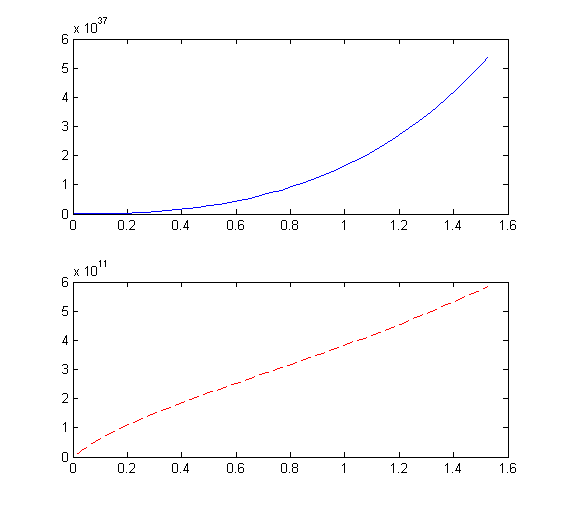
认为自变量为时间t,两个因变量为l 和 x
时间 t 范围取:0~1.524
l 初值取为:0
x 初值取为:661.4194946
修改后的MATLAB代码如下:
如果自变量、因变量以及因变量的初值理解有误,请自行修改之。CODE: function jie_odes
clear all;clc
format long
tspan=[0 1.524];
y0=[0,661.4194946];
[t y]=ode45(@obj,tspan,y0);
t
l=y(:,1)
x=y(:,2)
figure(1)
subplot(2,1,1)
plot(t,y(:,1),'b-');
subplot(2,1,2);
plot(t,y(:,2),'r--');
function f=obj(t,y)
s=0.883338769073639;
z=1;
l=y(1);
x=y(2);
f(1)=(-135.4376*(-26.29682+0.03645*t)*(58325*(1-x)-(58325*x*s)^2/(-0.03753273+0.00173326*t))/s*z);
f(2)=((81.3+42.97*s+(25.75257+10.317*s)*t+1/2*(162.886-2.04899999999998*s)*t^2+1/3*(-42.4392-3.8055*s)*t^3)/(1331.847424*(1+x))/((0.23743+25.75257*x+10.317*x*s)+...
(32.28+160.837*x-2.04899999999999*x*s)*t+(-11.5698-46.2447*x-3.8055*x*s)*t^2)*f(1));
f=f';